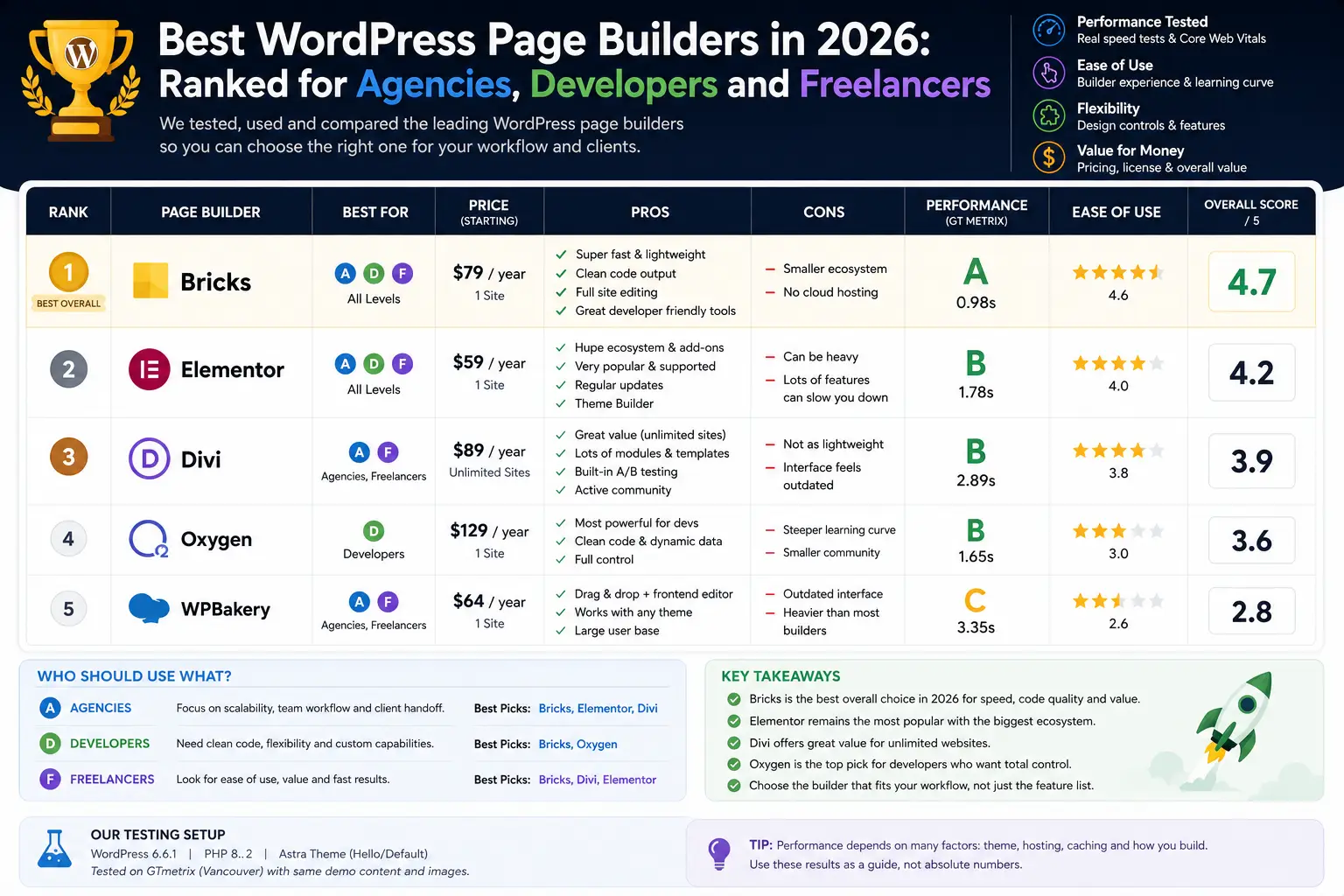
There is no best WordPress page builder, only a best one for a given job. The tool that lets a senior developer ship a sub-two-second custom build is the same tool that leaves a small business owner unable to edit their own homepage.
So this guide is organised the way the decision is actually made: by who is going to use the thing. Three broad camps, borrowed from how the market really splits. Marketers who need pages that convert and want to ship today. Agencies who need stability, repeatability and a handover that does not generate support tickets. Developers who want control of the markup and will accept a steeper curve to get it.
Disclosure: some links in this article are affiliate links. If you buy through them we may earn a commission at no extra cost to you. It does not change what we recommend.
Every builder below gets a verdict, the reason for it, and a link to the deeper comparison if it is on your shortlist. Prices move constantly, so treat any figure here as a prompt to check the vendor’s page rather than a quote.
What we weighed
Seven dimensions, in the order they tend to cost or save money on real client work:
- Output weight. How much markup, CSS and JavaScript ships before you optimise anything. This is the one you cannot fix later without effort.
- Design flexibility. Whether an unusual layout is an afternoon or an argument with the tool.
- Dynamic content. Custom post types, taxonomies and custom fields. Decisive for anything beyond a brochure site, irrelevant below that.
- Pricing model. Not the headline number but how it behaves as your site count grows, and what renewal looks like in year three.
- Maintenance. Update stability, plugin conflicts and how many moving parts you have added to every site you own.
- Handover. What a non-technical client can safely change, and what they can break.
- Scalability. Whether the workflow that suits one site still suits forty.
Weight these against your own situation rather than taking the order below as gospel. A freelancer with five brochure clients and an agency running eighty dynamic sites should reach different conclusions from the same table.
The shortlist at a glance
| Builder | Best for | Licence model | Output weight |
|---|---|---|---|
| Oxygen | Developers and performance-led agencies | One-time, unlimited sites | Very lean |
| Bricks | Agencies wanting speed with a friendlier editor | Annual and lifetime options | Very lean |
| Elementor Pro | Fast delivery, non-technical teams | Annual subscription | Heavier |
| Breakdance | One licence instead of five plugins | Annual subscription | Lean |
| Beaver Builder | Stability and white-label client work | Annual, unlimited sites | Moderate |
| Gutenberg and FSE | Budget builds and long-term safety | Free, in core | Lightest |
| Divi | Bundled theme and builder on a budget | Annual or lifetime | Heaviest |
If you want the mechanics behind why these differ so much in output weight, that is covered separately in how WordPress page builders actually work.
1. Oxygen Builder
Best for: developers and performance-led agencies. Oxygen replaces the WordPress theme outright rather than sitting on top of one, which is what lets it emit markup close to what you would write by hand. There is no theme layer to fight and no shortcode residue in the content.
The class-first workflow is the point and the barrier. You define styling through CSS classes rather than per-element panels, which produces a maintainable design system on a large site and feels obstructive on a small one. Dynamic data handling is strong, and it takes custom PHP, JavaScript and CSS directly, so the builder rarely becomes the reason something cannot be done.
The licence is a one-time fee for unlimited sites with lifetime updates, which is the single biggest reason agencies move to it: adding a client costs nothing in tooling. Set against that, a lifetime licence carries vendor risk, and the first week is genuinely hard.
Not the right pick if a client will maintain their own site. Full detail in our Oxygen Builder vs Elementor comparison, and you can see Oxygen Builder here.
2. Bricks
Best for: agencies that want lean output without Oxygen’s learning curve. Bricks is a theme rather than a plugin, so it becomes your theme, and it has become the default recommendation for a lot of studios that would previously have chosen Oxygen.
Output is comparably lean, the editor is more refined than Oxygen’s, and it ships more out of the box, including a native form builder and strong global classes. That last point matters more than it sounds: fewer add-ons means fewer licences, fewer conflicts and less update surface.
The trade-offs are licensing and maturity. Tiered pricing means per-site cost matters more than it does with an unlimited licence, and while the community is growing quickly it is still smaller than Elementor’s. For a team with juniors, the smoother editor often outweighs both.
The head-to-head is in Bricks vs Oxygen Builder.
3. Elementor Pro
Best for: fast delivery and teams where non-developers build pages. Elementor is the most widely used builder for reasons that are real rather than inertia: an enormous template and widget library, the deepest third-party add-on market, and an interface a marketer can be productive in within a day.
Its weakness is output weight. Widget-based layouts produce more nested markup, and the platform loads assets a page may not use, so hitting good Core Web Vitals takes deliberate work rather than arriving by default. That work is real time, and on a portfolio it recurs.
Licensing scales by site count, with the Expert plan covering up to 25 sites and the Agency plan up to 1,000. For a freelancer that is manageable; for a large portfolio the annual figure keeps growing. Its Editor V4 work is moving it toward reusable classes and states, which is a meaningful response to the code-quality criticism.
If your clients edit their own sites, this is the correct answer and the performance gap is an engineering problem, not a dealbreaker. You can see Elementor Pro here, or read Bricks vs Elementor for the closest modern alternative.
4. Breakdance
Best for: replacing several plugins with one licence. Breakdance comes from Soflyy, the same company behind Oxygen, and is positioned as the drag-and-drop builder to Oxygen’s developer tool.
Its argument is completeness. Forms, popups, headers, mega menus and a full WooCommerce builder are in the box rather than bolted on. For a freelancer who habitually installs a forms plugin, a popup plugin and a mega menu plugin on every project, that is a countable saving in licence cost, plugin conflicts and update surface.
Output is lean and there is a genuinely usable free tier. The main objection is that it is subscription only, with no lifetime option, which matters if you chose Oxygen specifically to escape renewals.
We reviewed it in depth in our Breakdance review, including who should walk straight past it.
5. Beaver Builder
Best for: stability and white-label client work. Beaver Builder is the least exciting builder here and that is close to the point. It powers over a million sites, it does not break on update, and its output is predictable.
The agency case is specific: unlimited sites on the higher plans, thorough white-labelling, and clean enough output that performance is rarely the problem you are debugging. Its performance sits mid-table but with very little variance, which for a portfolio is often worth more than a better best-case.
The cost is modernity. The interface feels dated next to Bricks or Breakdance, and design flexibility is narrower, so genuinely custom layouts take longer. It is a workhorse rather than a showpiece, and there are still plenty of client sites where that is exactly right.
6. Gutenberg and full site editing
Best for: budget builds, content-led sites and long-term safety. The block editor is in core, costs nothing, and produces the lightest output of anything on this list because there is no builder layer at all.
Full site editing has closed a lot of the gap on templates, headers and footers. For a blog, a documentation site or a straightforward brochure site, a good block theme plus core blocks is frequently the correct engineering decision, and it is the only option here with no vendor risk whatsoever.
Where it still struggles is complex layout work, conditional design and the kind of dynamic templating agencies do routinely. The editing experience for a non-technical client is also less forgiving than Elementor’s, which surprises people who assume core must be simpler.
It is the honest default for any project where nobody has asked for something a builder is required to deliver.
7. Divi
Best for: a bundled theme and builder on a fixed budget. Divi ships a huge library of pre-made layouts and a lifetime option, and for a solo operator building their own site the value is obvious.
For professional work the objections are harder to dismiss. Output is the heaviest here, and layouts have historically been tied to shortcodes, which means content does not survive leaving the builder cleanly. That is a migration problem you inherit rather than one you can solve later.
If it is already on a client site and performing acceptably, there is rarely a case for a disruptive rebuild. If you are choosing fresh for a portfolio, the options above are stronger on nearly every dimension that matters after launch.
A note on themes: Kadence, GeneratePress and Blocksy
These come up constantly in builder discussions and they are not builders. They are lightweight themes that pair with the block editor, and they solve a different problem: giving you a fast, well-structured starting point rather than a visual editing layer.
For a large share of client work, a good theme plus core blocks genuinely removes the need for a builder, which is the cheapest and fastest-loading answer available. The decision is not theme against builder on features, it is whether the project needs a design system a builder provides or simply needs to look tidy and load quickly.
Pick one lane rather than layering a heavy builder on top of a performance theme and losing the benefit of both. The three are compared directly in Kadence vs GeneratePress vs Blocksy.
Verdicts by who you are
For agencies
Bricks or Oxygen. Both give you lean output and a real design system; choose Oxygen if unlimited-site licensing and maximum control matter most, Bricks if editor quality and onboarding speed matter more because you have juniors or turnover. Beaver Builder remains a sound conservative pick where white-labelling and predictability outrank design ambition.
For developers
Oxygen, with Bricks a close second. Class-first workflow, direct code access and full control of the markup are what you are buying, and both deliver. If the work is mostly custom post types and dynamic templating rather than visual layout, Oxygen’s data handling is the stronger of the two.
For freelancers
It depends almost entirely on your clients. If they are non-technical and want to edit their own site, Elementor and the ecosystem around it will make you money faster. If you retain maintenance and care about margin across a growing portfolio, a one-time unlimited licence changes your economics more than any feature on this page. Breakdance is the middle path when you would rather buy one licence than five.
For beginners and small business owners
Start with the block editor and a good lightweight theme. If you outgrow it, Elementor is the gentlest step up and the easiest to find help with. Do not buy a developer-focused builder because a comparison article ranked it first, including this one; the tool that ranks highest on output quality is the tool most likely to leave you stuck.
Client handover, the part that decides profitability
Build quality is only half a project. What determines whether it stays profitable is what happens after handover, and builders differ more here than any spec table shows.
Oxygen’s client-safe edit mode reduces the interface to basic content editing and hides the developer features, which prevents the most common category of post-launch damage. Elementor takes the opposite approach: the client gets the same editor you did, which is either exactly what they wanted or the reason you are on the phone on a Saturday.
Licence transfer needs a decision at quote stage, not at launch. Whether the licence lives on your account or the client’s changes who is responsible when it lapses, and an expired licence on a live site is a support conversation you do not want to be having for free. Put it in the contract.
Frequently Asked Questions
Which WordPress page builder is fastest?
Nothing beats the block editor with a lightweight theme, because there is no builder layer at all. Among commercial builders, Oxygen and Bricks produce the leanest output, Breakdance and Beaver Builder sit in the middle, and Elementor and Divi are heaviest by default. Hosting, images and third-party scripts still decide most of your real-world load time.
Do I still need a page builder in 2026?
Often not. Full site editing now covers templates, headers and footers, so a block theme plus core blocks handles blogs, documentation and straightforward brochure sites well. A builder earns its place when you need complex layouts, conditional design or dynamic templating across custom post types, which is most agency work and not much else.
Which builder is best for client handover?
Elementor, if the client will genuinely edit their own pages, because it is designed for that. Oxygen has a client-safe edit mode that strips the interface back to content editing only, which suits a retainer arrangement where you keep control. The worst outcome is handing a non-technical owner a builder nobody has restricted.
Is a lifetime licence better than an annual subscription?
Across a portfolio, usually yes on cost, because a one-time unlimited-site fee replaces a bill that grows with your client count. The counterweight is vendor risk: a lifetime licence is only as good as the company honouring it, and that has gone badly for WordPress agencies before. Annual licensing is a defensible choice even though it costs more.
Can I switch page builders later?
Not easily, and you should assume not at all. Layouts are stored in builder-specific formats, so deactivating one leaves pages broken rather than plain. Oxygen goes furthest by replacing the theme entirely. Treat the builder choice as effectively permanent for the life of the site and keep content in standard WordPress fields wherever you can.
There is no winner on this page, and any ranked guide that ends with one is selling something. Match the builder to whoever maintains the site: core blocks when nothing more is needed, Elementor when the client edits, Oxygen or Bricks when you do, and Breakdance when consolidating licences is worth more than any of it.
Need a WordPress developer?
Let's build something fast, scalable, and SEO-ready — from a custom theme to a full headless stack.
Get in Touch