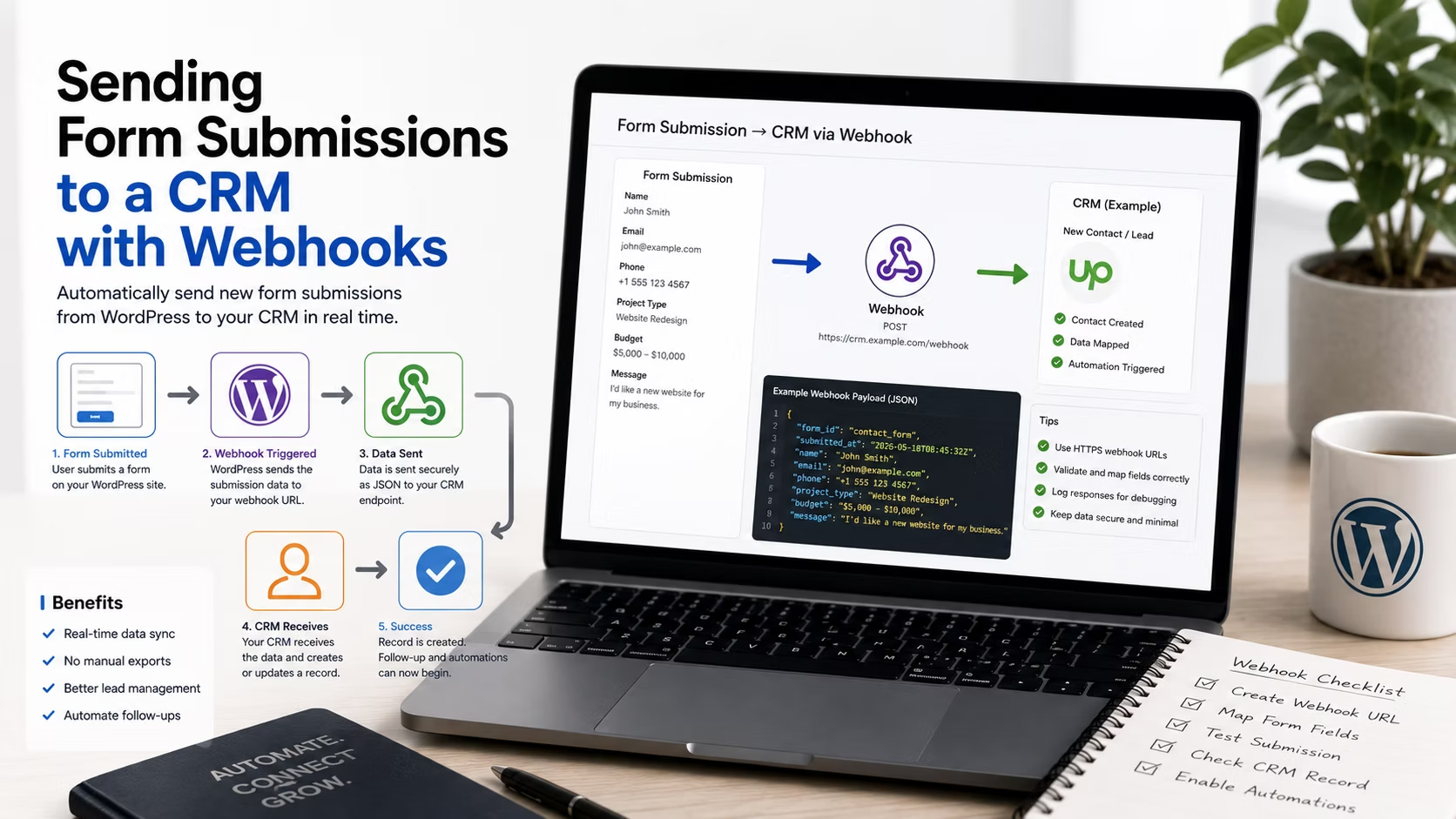
A lead arrives, an email notification goes out, and somebody copies the details into the CRM by hand. That works until it does not: a busy week, a holiday, a staff change, and suddenly the pipeline is missing a fortnight of enquiries that only exist in an inbox.
Connecting the form directly to the CRM removes the human step. There are two ways to do it, they fail differently, and choosing between them is mostly about who has to fix it at 9am when a lead does not appear.
Disclosure: some links in this article are affiliate links. If you buy through them we may earn a commission at no extra cost to you. It does not change what we recommend.
Native integration, connector, or webhook
Three options, in order of how much you should want them.
- A native add-on for that specific CRM. If your form plugin ships an integration for HubSpot, Salesforce, Pipedrive or Zoho, use it. Field mapping is handled in the interface, errors are logged where you can see them, and there is nothing between the two systems to break.
- A connector platform such as Zapier or Make. No code, thousands of destinations, and a monthly cost that scales with volume. Good for the long tail of tools nobody writes native support for.
- A raw webhook. The form posts a payload straight to an endpoint you specify. No monthly fee, no third party, and complete control over the shape of the request. It is also the option with the least hand-holding when something goes wrong.
Native connectors are the top tier feature on both major products. On Gravity Forms the full add-on library including the webhooks add-on and the heavier CRM connectors sits at the Elite licence, and WPForms places its Salesforce, HubSpot, Zoho and Pipedrive integrations along with its webhooks feature at the Elite tier too. If you are budgeting for a CRM-connected build, price the top tier from the start.
What a webhook actually sends
A webhook is an HTTP POST to a URL, carrying the submission as JSON or form-encoded data. The receiving system reads it and creates a record.
Three decisions matter when you configure one:
- The URL. Provided by the receiving system. Treat it as a secret, because anyone who has it can post fake leads into the client’s CRM.
- The payload shape. Field names must match what the CRM expects. This is where most of the setup time goes and where most of the bugs live.
- Authentication. Most endpoints want an API key in a header or a signing secret. An unauthenticated public endpoint accepting leads is a spam vector, not an integration.
Map fields explicitly rather than relying on defaults. A form field labelled Your name and a CRM field called first_name will not connect themselves, and a single unmapped required field causes the CRM to reject the whole record while the form reports a perfectly successful submission.
Plan for the failure, because it will happen
This is the part that separates an integration that survives from one that quietly stops working.
A webhook fires once. If the CRM is down for maintenance, rate limits you, or returns an error because a field changed, that lead is gone unless something catches it. The form still showed a success message. The client still believes the enquiry was received.
| Failure | What the visitor sees | What you need |
|---|---|---|
| CRM temporarily down | Success message | Retry with backoff |
| Rate limit hit during a campaign | Success message | Queue and retry |
| Field renamed in the CRM | Success message | Error logging and an alert |
| API key rotated or expired | Success message | Monitoring, plus a renewal reminder |
| Endpoint URL changed | Success message | Monitoring |
Every row shows a success message. That is the whole problem. Build three defences: keep the entry stored in WordPress as the source of truth regardless of whether the webhook succeeded, keep email notification running in parallel for the first month, and check the delivery log weekly until you trust it.
Keeping the local entry is the important one. If the CRM never receives a lead, you can still replay it. If the form was configured to send and forget, the lead only ever existed in transit.
Connector platform or direct webhook
The honest comparison for agency work.
| Connector platform | Direct webhook | |
|---|---|---|
| Setup time | Minutes | An hour or more, first time |
| Monthly cost | Per task, grows with volume | None |
| Retries | Built in | Only if the plugin provides it |
| Error visibility | Good dashboard | Whatever you build |
| Who can fix it | Often the client | You |
| Failure mode | Runs out of tasks | Silent |
For a single client site sending a few hundred leads a month, a connector is usually the better business decision even though it costs money, because the client can see the run history and a non-developer can repair a broken mapping. Direct webhooks win on high volume, where per-task pricing becomes real money, and where the payload needs shaping the connector cannot do.
The pattern is the same regardless of which CRM sits on the other end. The client website launch workflow describes it with one platform, and the comparison of FluentCRM and ActiveCampaign is worth reading first if the CRM itself is still undecided, because a CRM that lives inside WordPress removes this integration problem entirely.
Test it like a sceptic
- Submit a real entry and confirm the record appears in the CRM with every field populated, not just the name and email.
- Submit with optional fields empty. Missing values are a common cause of rejection.
- Submit something with an apostrophe, an accent and an emoji. Encoding bugs surface here.
- Turn the endpoint off deliberately and confirm the entry is still stored in WordPress.
- Check the plugin’s webhook or feed log and confirm it records both successes and failures.
Then set a calendar reminder to check the log again in a month. Integrations rot quietly, usually when someone in the client’s team edits a CRM field and has no idea a website depends on its name.
Frequently Asked Questions
Do I need Zapier to connect a WordPress form to a CRM?
No. If your form plugin has a native add-on for that CRM, use it, because there is one less system to break. A raw webhook works too and costs nothing. Zapier and similar platforms earn their fee on the long tail of tools nobody writes native support for, and on giving the client a run history they can read themselves.
What happens to a lead if the webhook fails?
With no retry mechanism, it is lost from the CRM’s point of view while the visitor sees a success message. This is why the form entry must remain stored in WordPress and why email notification should run in parallel at least initially. The stored entry lets you replay a failed delivery instead of discovering an unrecoverable gap.
Is a webhook endpoint a security risk?
The URL should be treated as a credential, because anyone holding it can post data into the client’s CRM. Use authentication such as an API key header or a signing secret, transmit only over HTTPS, and rotate the key if it is ever exposed in a screenshot, a support ticket or a shared document.
Which licence tier do I need for CRM integrations?
The top tier on both major form plugins, in practice. Gravity Forms places its full add-on library including webhooks at Elite, and WPForms puts Salesforce, HubSpot, Zoho, Pipedrive and its webhooks feature at Elite as well. Price accordingly rather than quoting the entry tier and absorbing the difference.
Should the form still send an email if the CRM receives the lead?
Keep both running for at least the first month. Email is the fallback that proves a lead arrived when the CRM record is missing, and it is what the client will instinctively check. Once the delivery log has been clean for a few weeks, switching the notification to a summary rather than every submission is reasonable.
Prefer a native integration, fall back to a connector when one does not exist, and use raw webhooks when volume or payload control justifies the extra care. Whichever you pick, keep the entry in WordPress, watch the delivery log, and assume a success message is proof of nothing on its own.
Need a WordPress developer?
Let's build something fast, scalable, and SEO-ready — from a custom theme to a full headless stack.
Get in Touch