Every client site you hand over needs a CDN. Choosing one for a single site is easy. Choosing one you will still be happy with across thirty client sites, two years from now, is a different problem.
Most comparisons of Cloudflare vs BunnyCDN for WordPress stop at a feature grid. That grid will not tell you what happens when a cached page serves a stale checkout, or what your bill looks like when the same plan is billed per domain across an agency portfolio. This guide covers the parts that actually cost you time and money: real pricing, image handling, WordPress cache rules, and the specific things that break.
Disclosure: some links in this article are affiliate links. If you buy through them we may earn a commission at no extra cost to you. We only recommend tools used on real client builds.
The quick verdict
If you want the short answer before the detail:
- Cloudflare wins on price for most standard client sites. The free plan includes the CDN, unmetered DDoS protection and SSL. For a brochure site, a local service business or a small blog, your CDN cost is zero and stays zero.
- bunny.net wins on control and on predictable bandwidth cost. Pay-as-you-go pricing means a media-heavy site costs cents, and the cache controls are simpler to reason about.
- The pricing flips on image transformation. Bunny charges a flat fee per site. Cloudflare meters by volume. Which is cheaper depends entirely on how many sites you run.
- Neither one fixes a slow origin. A CDN moves files closer to visitors. It does not make a badly built site fast.
If you are still fuzzy on where a CDN ends and a page cache begins, read how CDN and caching work together first. The rest of this article assumes you know the difference.
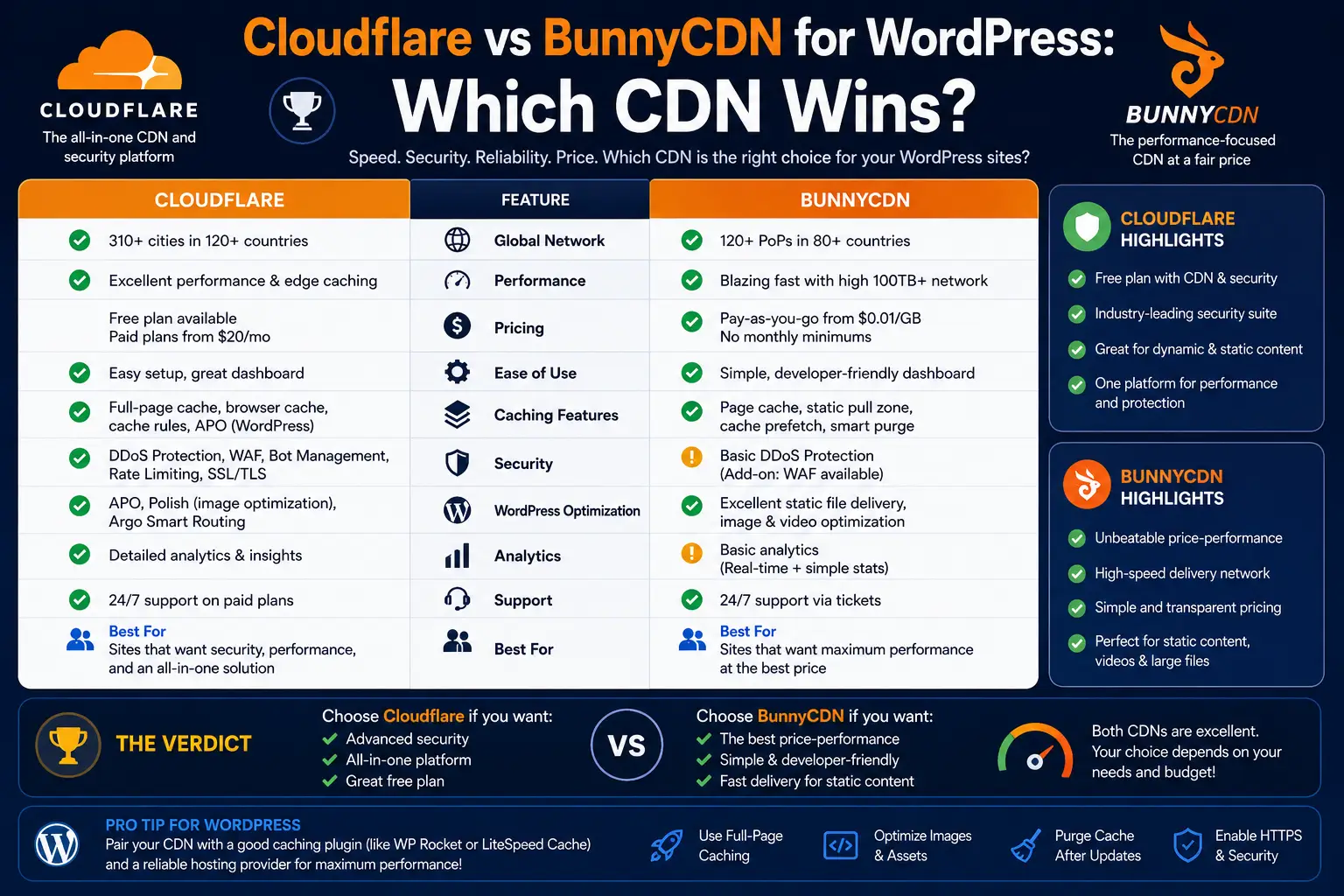
Cloudflare vs BunnyCDN at a glance
| Cloudflare | bunny.net | |
|---|---|---|
| Free tier | Yes — CDN, unmetered DDoS, SSL, 10 cache rules | None. $1 monthly account minimum |
| Bandwidth | Unmetered on every plan | $0.01/GB Europe and North America; $0.03 Asia and Oceania; $0.045 South America; $0.06 Middle East and Africa |
| Paid tier | Pro $20/mo billed annually, $25/mo monthly — per domain | Pay as you go. No per-domain fee |
| Network | 337 cities, 100+ countries | 119 points of presence, 77 countries |
| HTML caching | Off by default. Needs cache rules or APO | Off by default. Needs edge rules or the plugin |
| Image handling | Polish and Mirage on Pro and above; Images charges per transformation | Bunny Optimizer, $9.50 per site per month, unlimited transformations |
| Cache rules | 10 Free, 25 Pro, 50 Business, 300 Enterprise | Edge Rules on every pull zone |
| Official WordPress plugin | 200,000+ active installs | 10,000+ active installs |
| Security | Unmetered DDoS and a WAF included | Sold separately as Bunny Shield |
Two lines in that table decide most agency choices: per domain on the Cloudflare row, and per site per month on the Bunny Optimizer row. Everything else is detail.
What each one actually costs
Cloudflare’s pricing shape
Cloudflare sells plans per zone, and a zone is a domain. The published plans are Free, Pro at $20 a month billed annually or $25 monthly, and Business at $200 a month annually. Bandwidth is unmetered on all of them.
That shape is generous for one site and awkward for many. One client on Pro is $240 a year. Ten clients on Pro is $2,400 a year, for the same feature set repeated ten times.
The free plan is genuinely usable. You get the global network, unmetered DDoS protection, a free certificate and ten cache rules. For a large share of client sites, that is the whole requirement.
Bunny’s pricing shape
bunny.net has no free tier and no per-domain fee. You pay for bandwidth. The published rates are $0.01 per GB in Europe and North America, rising to $0.06 per GB in the Middle East and Africa, with a $1 monthly minimum on the account. A high-volume network tier drops to $0.005 per GB.
A typical small business site serving well under 50 GB a month lands in cents. Even a busy site rarely reaches the cost of a single Cloudflare Pro plan on bandwidth alone.
The agency math
Put thirty client sites through both and the numbers separate fast.
On Cloudflare’s free plan, thirty sites cost nothing. On Pro, the same thirty cost $600 a month, because the plan is charged once per domain. On bunny.net, thirty sites each pushing 50 GB a month is 1,500 GB, or roughly $15 a month in European and North American traffic — one bill, not thirty.
There is a third route that agencies often miss. Some managed hosts resell an enterprise Cloudflare tier as a cheap per-site add-on. Cloudways, for example, prices its Cloudflare Enterprise add-on on a sliding scale that drops to $2.99 per domain per month at ten to twenty-four domains and $1.99 at twenty-five or more, with 100 GB of bandwidth included per domain and $0.02 per GB after that. For a portfolio of client sites that is a fraction of retail Pro pricing, and it comes with the host’s own tooling.
If you are planning infrastructure for a growing book of clients, this decision belongs in the same conversation as scaling your hosting as the agency grows. CDN, host and cache plugin are one system, not three purchases.
Image optimisation is where the pricing flips
Images are the largest part of most WordPress pages, so this is the section that changes bills.
bunny.net sells Bunny Optimizer at $9.50 per website per month. That covers unlimited requests, unlimited optimisations and unlimited transformations: WebP conversion, on-the-fly resizing and cropping through URL parameters, device-based sizing, and CSS and JavaScript minification. Flat fee, no metering, no surprises.
The catch is the word *website*. Thirty client sites on Bunny Optimizer is $285 a month. Excellent for one flagship site, expensive as a default.
Cloudflare splits this in two. Polish and Mirage are bundled from the Pro plan up, so they arrive with the $20 you are already paying. Separately, Cloudflare Images allows 5,000 unique transformations a month at no cost and then charges $0.50 per 1,000, with repeat requests for the same transformation inside a month counted once. Storage and delivery of images held in Cloudflare are billed on top.
Because Cloudflare meters by volume rather than by site, a portfolio of small sites does not multiply the way a per-site fee does. Confirm how the allowance applies to your own account before you budget for it.
There is a cheaper third answer: fix the images before they ever reach the edge. Serving correctly sized, already-compressed files makes edge transformation a nice-to-have rather than a line item. Our guide to compressing WordPress images without quality loss covers the origin-side workflow, and an origin-side tool such as Image Optimizer by Elementor handles the bulk conversion inside WordPress itself. A CDN should not be paid to rescue a 4 MB hero image every month.
Cache rules for WordPress
Here is the thing most people get wrong. Neither CDN caches your HTML by default.
Cloudflare’s documentation is explicit: the CDN does not cache HTML or JSON by default. It caches by file extension — images, CSS, JavaScript, fonts, PDFs — and it refuses to cache anything that arrives with a `Set-Cookie` header or a `no-store`, `no-cache` or `private` directive. Bunny behaves the same way through a pull zone.
So out of the box, a CDN is speeding up your assets while every page request still travels back to your origin. That is why a site can be on a CDN and still feel slow, and it is one of the reasons a site can stay sluggish even after you install optimisation plugins.
You have three ways to close that gap.
1. Turn on full-page edge caching deliberately. On Cloudflare that means cache rules, which make HTML eligible for cache and set an edge TTL. On Bunny it means edge rules on the pull zone. In both cases you are opting in, and you own the consequences.
2. Use Cloudflare’s Automatic Platform Optimization. APO serves the whole WordPress site from the edge and purges automatically when you publish. It is included from the Pro plan up and must be purchased separately on the free plan. It also expects you to disable competing page caches while you test it.
3. Keep the page cache at the origin. Let the CDN handle assets and let a caching plugin handle pages. This is the least fragile option, and for client sites you will not be babysitting, it is usually the right one. If you are weighing the plugin side of that, we compared WP Rocket against the free caching plugins in detail — and WP Rocket ships CDN integration, so the two layers cooperate instead of fighting.
Whichever route you take, the exclusion list is the same. Never cache:
- `/wp-admin/` and `wp-login.php`
- `/cart/`, `/checkout/`, `/my-account/` and their equivalents in other languages
- REST API and admin-ajax endpoints that return per-user data
- Any URL carrying a query string tied to a session
And bypass the cache whenever these cookies are present:
- `wordpress_logged_in_*`
- `wp-*` and `wp_woocommerce_session_*`
- `woocommerce_items_in_cart` and `woocommerce_cart_hash`
- `comment_author_*`
- `edd_*` if you run Easy Digital Downloads
Cloudflare publishes a worked example of bypassing cache on a cookie using a custom filter expression. Bunny handles the same job with edge rules, and its vary cache by cookie feature can hold separate cached copies for logged-in and logged-out visitors rather than bypassing the cache entirely.
One thing worth knowing if you use APO: Cloudflare already bypasses the cache for a published list of cookie prefixes, including `wordpress`, `wp-`, `comment_`, `woocommerce_` and `edd_`, and it bypasses any URL carrying a query string. That default list is documented alongside how APO treats query parameters and cookies. It covers the common cases. It does not know about your custom membership plugin.
What actually breaks
When a WordPress site behind a CDN misbehaves, it is nearly always one of four things.
Nonces
A WordPress nonce is a one-time token that proves a request came from the right user. Per the official developer documentation, nonces are unique to the current user’s session and expire after roughly 12 to 24 hours. If a user logs in or out, any nonce already on the page stops being valid.
Cache a page containing a nonce and serve it to a second visitor, and that visitor gets a token that was never theirs. The symptoms are familiar: AJAX calls returning 403, comment submissions rejected, and the classic *”Are you sure you want to do this?”* screen. Cloudflare’s own guidance points at shortening edge TTL for pages that generate nonces or CAPTCHAs.
Carts and checkout
WooCommerce keeps cart state in a session cookie and refreshes cart fragments over AJAX. Cache the shop page too aggressively and shoppers see someone else’s cart total, an empty mini-cart that will not update, or a checkout that loops. Excluding cart, checkout and account URLs is not optional.
Logged-in users
Membership sites, LMS platforms and client-facing dashboards render different HTML per user. Without a cookie bypass, the first logged-in visitor’s page becomes everyone’s page — including the admin bar, and sometimes including their name.
Purge timing
Edit a page, look at it, and see the old version. Cloudflare’s WordPress plugin purges automatically on publish, though it only clears pages without query strings. Bunny’s plugin offers its own purge controls. Either way, test the purge behaviour before you hand the site to a client, because “I updated it and nothing changed” is the support ticket you will get most.
Where each one is genuinely weak
Cloudflare’s weak points. Configuration lives in a dashboard that gets bigger every year, and the number of cache rules you get is tied to your plan — ten on Free. The free tier has no uptime SLA. It is a security and network platform that happens to include a CDN, so simple asset delivery involves more surface area than the job needs. And the price shape punishes agencies: everything meaningful is billed per domain.
Bunny’s weak points. There is no free tier, so every client site becomes a line item, however small. The network is 119 points of presence against Cloudflare’s 337 cities, which matters most for audiences outside Europe and North America. Security is a separate purchase rather than an included default. The official WordPress plugin sits at 10,000-plus installs against Cloudflare’s 200,000-plus, which means fewer people have hit your edge case before you. And usage-based billing means an unexpected traffic spike shows up as an unexpected invoice.
Both. Neither one improves a slow database query, a bloated page builder or an origin with high response time. If your Time to First Byte is poor before the CDN, it will still be poor for the first visitor in every region after it. Measure with real data — our Core Web Vitals guide explains which numbers to trust.
Best for X
Best for the standard client brochure site: Cloudflare Free. Zero cost, DDoS protection included, and the ten cache rules are enough for a WordPress exclusion list. Set it and forget it.
Best for a media-heavy or global site: bunny.net. Pay-as-you-go bandwidth is close to free at typical volumes, and the edge rules are easier to reason about than Cloudflare’s rules engine.
Best for WooCommerce and membership sites: Cloudflare, with full-page caching off. Let the CDN carry assets and let the origin handle pages. Fewer moving parts means fewer chances to serve one customer’s cart to another.
Best for a single flagship image-heavy site: bunny.net with Bunny Optimizer. $9.50 a month for unlimited transformation is excellent value once — and only once.
Best for an agency running twenty or more sites: a host-bundled enterprise Cloudflare tier. At $1.99 to $2.99 per domain you get enterprise-grade routing without the enterprise contract, and one dashboard instead of thirty.
Best for the client who will never log in again: whichever you can hand over. Cloudflare’s larger plugin install base means better documentation and more community answers when a future developer inherits the site.
Final recommendation
For most agencies building most client sites, the honest answer is Cloudflare on the free plan — not because it is technically superior, but because it is free at any number of domains, it includes security you would otherwise buy, and the next person to touch the site will recognise it.
Move to when a specific site earns it: heavy media, a global audience, or a client who needs image transformation on one property rather than thirty. Move to a paid tier when a site genuinely needs the WAF rules, the analytics or the SLA — not by default.
And resist the popular “use both” advice unless you have a reason you can articulate. Running Cloudflare in front of a Bunny pull zone adds a hop, two caches and two purge mechanisms to debug. That is a real cost, paid in support hours.
Whatever you pick, prove it. Run the same page through a synthetic speed test from three regions before the CDN and after, with cache warmed, and keep the result. That five-minute test settles more arguments than any comparison table — including this one.
Frequently Asked Questions
Is Cloudflare or BunnyCDN better for WordPress?
For most WordPress client sites, Cloudflare’s free plan is the better default: it costs nothing per domain and includes unmetered DDoS protection and SSL. bunny.net is the better choice for media-heavy sites, global audiences, or when you want pay-as-you-go bandwidth and simpler edge rules. Neither is universally better — the deciding factor is usually how many sites you run and how much media they serve.
Does a CDN cache my WordPress HTML by default?
No. Cloudflare’s documentation states the CDN does not cache HTML or JSON by default, and Bunny behaves the same way through a standard pull zone. Both cache static assets such as images, CSS, JavaScript and fonts by file extension. Full-page caching has to be enabled deliberately with cache rules, edge rules, or Cloudflare’s Automatic Platform Optimization.
Will a CDN break my WooCommerce cart?
It can, if you enable full-page caching without exclusions. WooCommerce stores cart state in session cookies, so a cached shop page can show a stale or incorrect cart. Exclude the cart, checkout and account URLs, and bypass the cache whenever cookies such as wp_woocommerce_session_, woocommerce_items_in_cart or woocommerce_cart_hash are present.
Why do WordPress nonces fail behind a CDN?
A WordPress nonce is tied to the current user’s session and expires after roughly 12 to 24 hours. If an edge cache stores a page containing a nonce and serves it to a different visitor, that token is invalid for them. The result is AJAX requests failing with 403 errors or the “Are you sure you want to do this?” message. Fix it by bypassing the cache on logged-in cookies and shortening edge TTL on pages that generate tokens.
How much does BunnyCDN cost compared to Cloudflare for an agency?
bunny.net charges $0.01 per GB in Europe and North America with a $1 monthly account minimum and no per-domain fee, so thirty sites serving 50 GB each is roughly $15 a month in total. Cloudflare’s free plan is $0 at any number of domains, but Pro is billed per domain at $20 a month annually — $600 a month for the same thirty sites.
Is Bunny Optimizer worth $9.50 a month?
On a single image-heavy site, usually yes: it covers unlimited WebP conversion, on-the-fly resizing and CSS and JavaScript minification for a flat fee regardless of traffic. Across a portfolio it multiplies, because it is priced per website. Thirty sites would cost $285 a month, at which point optimising images at the origin before upload is far cheaper.
Should I use Cloudflare and BunnyCDN together?
Only with a specific reason. The common setup puts Cloudflare in front for DNS and security while Bunny serves heavy media from a separate hostname. It works, but it adds an extra network hop, two caches and two purge mechanisms to troubleshoot. For most client sites the added support burden outweighs the gain.
Working through a stack decision for a client build? Our WordPress performance guides cover the caching, hosting and image layers that sit either side of your CDN — so you can price the whole system, not one part of it.
Need a WordPress developer?
Let's build something fast, scalable, and SEO-ready — from a custom theme to a full headless stack.
Get in Touch