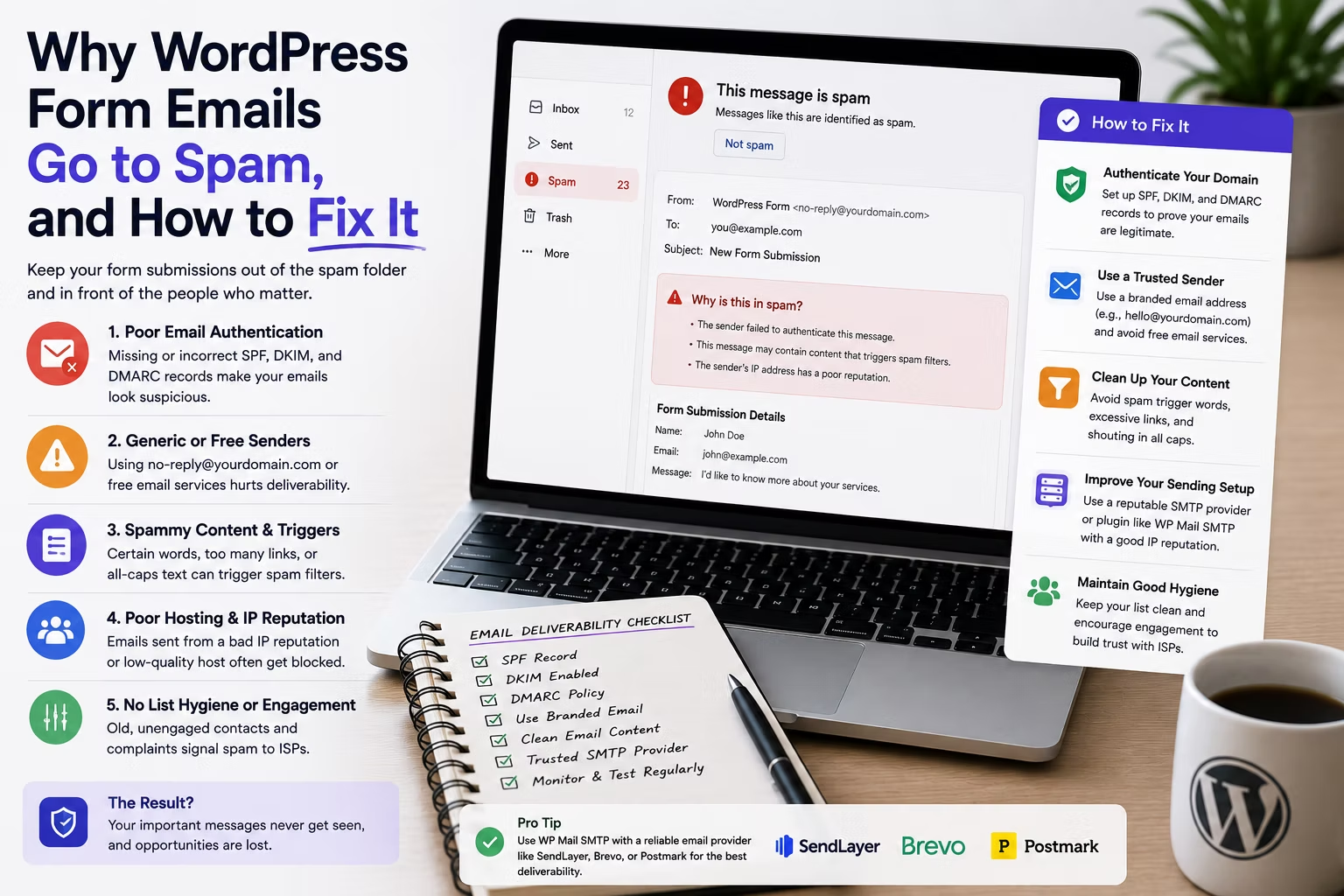
The worst bug in client work is the one that produces no error. The form submits, the success message appears, the entry lands in the database, and the notification email quietly never arrives. Everything looks fine on your screen and the client is losing enquiries.
This is the single most common support ticket on a WordPress site that has just launched or just moved host, and it is almost never the form plugin’s fault. It is how WordPress sends mail.
Disclosure: some links in this article are affiliate links. If you buy through them we may earn a commission at no extra cost to you. It does not change what we recommend.
What actually goes wrong
By default WordPress sends mail through PHP’s mail() function, which hands the message to whatever mail transfer agent the server happens to run. That message arrives at Gmail or Microsoft 365 with three problems attached.
- It fails authentication. The From address usually claims to be the client’s domain, but the sending server is your web host. If the domain’s SPF record does not list that host, the receiving mail server sees a message pretending to be from a domain it is not authorised to send for.
- It is not signed. With no DKIM signature there is nothing cryptographic tying the message to the domain, so the recipient has only the sending IP to judge it by.
- The sending IP has no reputation. A shared hosting IP sends mail for hundreds of unrelated sites. Its reputation is an average of strangers, and you inherit it.
Any one of those is survivable. All three together is why a form notification lands in Junk, or is silently discarded before it reaches a folder at all.
The fix is SMTP, not a better form plugin
Swapping form plugins does not help, because they all hand the message to WordPress in the same way. What changes the outcome is configuring WordPress to send through an authenticated SMTP service that is allowed to send for the domain.
You have two sensible categories to choose from:
- The client’s existing mailbox provider. Google Workspace or Microsoft 365 over authenticated SMTP. Fine for low volume, uses infrastructure the client already pays for, and the From address matches a real mailbox. Watch the daily sending limits.
- A transactional email service. Postmark, Mailgun, SendGrid, Brevo, Amazon SES. Built for exactly this, with proper deliverability reporting and a log of every message sent. This is what you want on anything commercial.
Either way you configure the service, verify the sending domain, and add the DNS records the provider gives you. The plugin layer is the easy part: WP Mail SMTP, built by the same team behind WPForms, handles it for most sites, and Gravity SMTP does the equivalent job for a Gravity Forms build. Both simply reroute WordPress mail through the authenticated service.
The three DNS records that decide everything
| Record | What it does | Get it wrong and |
|---|---|---|
| SPF | Lists which servers may send for the domain | Mail is marked as a forgery |
| DKIM | Cryptographically signs each message | Nothing proves the message is genuine |
| DMARC | Tells receivers what to do when SPF or DKIM fails, and where to report | You have no visibility and no policy |
Two details cause most of the remaining failures. A domain may have only one SPF record, so adding a second rather than merging into the existing one breaks both. And DMARC alignment requires the visible From domain to match the authenticated domain, which is why sending as noreply@clientdomain.com through an unverified service still fails even after SMTP is configured.
Set the From address correctly
Here is the mistake that survives every other fix. Many form plugins default the notification From address to the address the visitor typed into the form, so replying is easy.
That is spoofing. You are sending mail from your server claiming to be a Gmail or Outlook user, and DMARC exists specifically to stop that. Modern receivers reject it outright.
The correct configuration is a From address on the client’s own authenticated domain, with the visitor’s address in the Reply-To field. The client still hits reply and reaches the customer, and the message passes authentication. Every serious form plugin supports this, and it takes thirty seconds per form.
Test it properly, not by emailing yourself
Sending a test to your own inbox proves almost nothing, especially if you use the same provider as the site. Instead:
- Send test submissions to a Gmail address, a Microsoft 365 address and one other provider. They filter very differently.
- Open the received message and inspect the headers. You want
spf=pass,dkim=passanddmarc=pass, not just delivery. - Run the domain through a mail authentication checker before you hand the site over.
- Check the transactional provider’s log, which distinguishes accepted, delivered, bounced and dropped. The plugin’s own log only knows whether it handed the message over.
Add this to your launch checklist and to your migration checklist, because moving host invalidates SPF the moment the old server stops being authorised. It is the same category of problem covered in the checklist for migrating WordPress without losing SEO, and it is worth checking as deliberately as redirects are.
Who pays for it
Transactional email for a typical business site costs nothing or close to nothing. Most providers have a free tier covering a few thousand messages a month, which is far more than a contact form generates.
The real cost is setup time and the ongoing responsibility of noticing when it breaks. Across a portfolio that is a recurring line item, and it belongs in the plan rather than in your evenings. If you are working out how to price that kind of ongoing work, the breakdown of what agencies charge for WordPress maintenance puts a number on it.
Frequently Asked Questions
Why do form notifications arrive for me but not for the client?
Because your mail provider trusts the message and theirs does not. Filtering decisions are made per recipient, using that recipient’s provider, its rules and its history with the sending IP. A message that reaches your inbox and lands in the client’s Junk folder is not delivered inconsistently, it is being judged by two different sets of rules.
Do I need SMTP if the host says it handles email?
Usually yes. Hosts that offer transactional sending often send from a shared pool without configuring your client’s domain for authentication, and the mail still fails alignment. Ask the specific question: does the domain have SPF, DKIM and DMARC records that authorise this sending path? If the answer is vague, configure SMTP yourself.
Should the form notification come from the visitor’s email address?
No. Send from an address on the client’s own authenticated domain and put the visitor’s address in Reply-To. Sending as the visitor is spoofing, it fails DMARC at any strict receiver, and it is one of the most reliable ways to get an entire domain’s mail treated with suspicion.
Does a DMARC policy of none do anything useful?
Yes, as a diagnostic. A policy of none instructs receivers to take no action but still send aggregate reports, so you learn which sources are sending as the domain and whether they pass authentication before you enforce anything. Move to quarantine and then reject once the reports are clean.
Will fixing this improve marketing email deliverability too?
It helps, but they are separate problems. SPF, DKIM and DMARC benefit every message from the domain. Marketing email is additionally judged on list quality, engagement and complaint rate, none of which authentication addresses. Fix the records first, then treat the campaign side as its own piece of work.
Configure authenticated SMTP on every build, set the From address to the client’s domain, verify the DNS records, and test against more than one provider. It is an hour of work that prevents the most expensive silent failure in WordPress.
Need a WordPress developer?
Let's build something fast, scalable, and SEO-ready — from a custom theme to a full headless stack.
Get in Touch