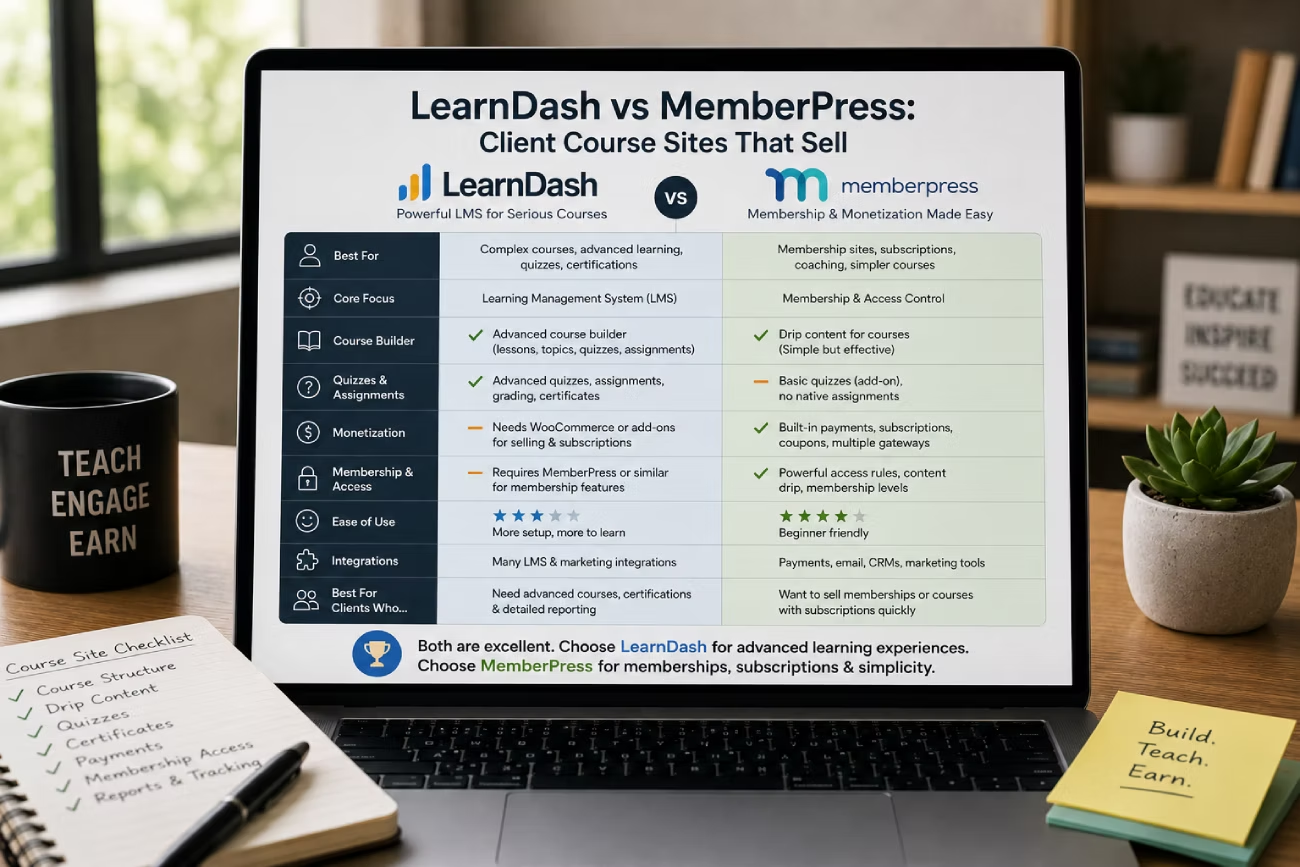
Sooner or later a client says it: “I want to sell my course on my own site.”
The next choice you make is not really a plugin choice. It is a two-year support commitment. You are picking the thing you will renew, patch, migrate and explain on the phone long after the build invoice is paid.
LearnDash and MemberPress are the two names that come up every time. Both sell courses now. Both handle memberships and recurring payments now. That overlap is real, and it is why this comparison is harder than it was three years ago. The differences that matter show up in what each one leaves out at the price you already quoted.
Here is the honest version, written for the person who has to support the site, not the person buying the course.
Disclosure: some links in this article are affiliate links. If you buy through them we may earn a commission at no extra cost to you. We only recommend tools we build with.
The quick verdict
Reach for LearnDash when the product is a real course. Lessons in a fixed order, quizzes that count, certificates the learner will show an employer. Its entry plan already includes the teaching tools, so you are not upselling the client a month after launch.
Reach for MemberPress when the product is access. A paywall, a recurring subscription, a community, a coaching programme. Its access rules and billing are the strongest part of the plugin, and nothing else in this price bracket protects content as cleanly.
If the client wants three videos behind a login, either one works. Pick the one you already know and move on. If the client wants graded assessment, or wants a forum, the coin flip ends.
Where the two genuinely overlap
It is worth being blunt about this, because most comparison posts pretend the two products live in different worlds. They do not.
Both build unlimited courses and lessons with a drag-and-drop curriculum builder. Both take card payments. Both handle recurring subscriptions and one-off purchases. Both restrict content to paying members. Both ship a coupon system. Both can run the whole site on their own, with no second plugin.
So the old advice – “use MemberPress for the paywall and LearnDash for the lessons” – is now the expensive answer, not the default one. Running both means two licences, two renewal dates, two support queues and one more integration that can break during a core update. Do it only when the client genuinely needs the deep LMS features *and* the deep membership features, and say so on the quote.
Side by side: what you actually get at each price
Prices below are the vendors’ listed annual figures at the time of writing. Both companies have reshuffled their plans recently, so confirm the current page before you put a number in a proposal.
| LearnDash | MemberPress | |
|---|---|---|
| Built around | Course structure and learner progress | Access rules, subscriptions and billing |
| Entry plan | Essentials, $259/yr | Launch, $199.50/yr (listed against $399) |
| Quizzes on the entry plan | Yes | No – Growth, $349.50/yr, and up |
| Certificates on the entry plan | Yes | No – Growth and up |
| Payment gateways on the entry plan | Stripe and PayPal | Stripe only |
| Transaction fee on the entry plan | None listed | 4.9% per transaction |
| Assignments and dripping | Not listed on the pricing page | Growth and up |
| Community and member directory | Not offered | Growth and up |
| Coaching workflows | Not offered | CoachKit, Growth and up |
| Cohorts and groups | Pro, $399/yr | Corporate accounts on Scale, $499.50/yr |
| Multi-instructor | Elite, $599/yr | Not offered |
| Built-in affiliate programme | Not included | Easy Affiliate on Scale |
| Reporting dashboard | Pro and up | Gradebook on Scale |
| Site activations | One site per licence | One site per licence |
Read that table twice, because it inverts the story most people repeat.
MemberPress looks cheaper at the entry tier. It is not, if the client wants a course with quizzes and a certificate. Those sit on the Growth plan, which lands above LearnDash Essentials. And the Launch plan charges 4.9% on every transaction, on top of what the card processor takes. On a $2,000 launch that is $98 gone. On a $50,000 year it is $2,450 – far more than the plan upgrade that removes the fee.
LearnDash flips it the other way. Everything a teacher needs is in Essentials. Everything an *administrator* needs – reporting, enrolment tracking, weighted grading, cohorts – starts at Pro. If your client is one person selling one course, Essentials is genuinely enough. If they run intakes, or have a second instructor, the price climbs quickly.
Where each one needs add-ons
What LearnDash does not do on its own
No community. No forum, no member directory, no direct messaging. If the client says the words “student community”, you are adding another plugin and another licence.
No coaching layer. No habit tracking, no client check-ins, no milestone workflow. That is a genuine gap if the course is really a coaching programme with videos attached.
No affiliate programme. If the client wants their students to resell the course, that is a separate product.
Billing is capable but plain. Stripe and PayPal, subscriptions, bundles. Order bumps, gift cards and corporate seat purchases are not part of the picture.
What MemberPress does not do on its own
No assessment on the cheapest plan. Quizzes, assignments and certificates only appear on Growth. This is the single most common surprise on a MemberPress quote.
No multi-instructor model. There is no instructor role, no front-end course creation, no way for a guest expert to build their own module. For an academy with several teachers, that is disqualifying.
Shallow learner analytics at the low tiers. The gradebook is a Scale feature. Below that you know who paid, not who is learning.
One gateway at the bottom. Launch is Stripe only. PayPal, Square and manual payments arrive at Growth, and Authorize.net at Scale. Plenty of clients still insist on PayPal, and that requirement alone can decide the plan.
What the build really costs
The plugin licence is rarely the biggest line on the invoice. A realistic first-year budget for a small client course site looks more like this:
- LMS or membership licence – $200 to $600 a year, per site
- Hosting – a course site is a logged-in site, so cheap shared hosting is a false economy
- Video hosting – self-hosting course video on the same server is the classic beginner mistake
- Design and build – your time, and the bulk of the cost
- Payment processing – roughly 2-3% plus a fixed fee, before any plugin transaction fee
- Email and automation – the client will want a sequence the day after launch
Hosting deserves its own thought. Course sites are unusual: almost every valuable page is served to a logged-in user, so ordinary page caching helps far less than it does on a brochure site. Video streams, quiz submissions and progress writes all hit PHP and the database. Something like scalable managed cloud hosting is a much safer starting point than a $4 plan, and it is worth reading through the options for managed WordPress hosting built for agencies before you commit a client to a stack you cannot scale.
The sales side needs a budget line too. A course does not sell because it exists; it sells because there is a landing page, an offer and a follow-up sequence behind it. Both plugins give you a checkout, not a funnel. If you are assembling that yourself, the approach in build a sales funnel without ClickFunnels keeps the whole thing inside WordPress instead of bolting on another subscription.
On design: MemberPress ships ReadyLaunch, a built-in template system that produces a clean, functional course area with no page builder at all. It is plain, but it is fast to ship and it is one less thing to maintain. LearnDash leans on your theme and builder instead, which is more work and much more control. If the client wants a sales page that actually converts, most freelancers reach for a builder such as Elementor for the marketing pages and leave the course area on the plugin’s own templates. There is a fuller rundown in this comparison of page builders that suit freelance workflows.
What you will be supporting for the next two years
This is the part that never makes it into the sales page, and it is the part that decides whether the project is profitable.
Licences renew, and they renew per site
Both vendors have moved towards single-site licensing. MemberPress states plainly that its Launch, Growth and Scale plans each come with one site activation, with extra activations bought separately. LearnDash retired its multi-site tiers as well, so a second client site means a second licence.
For an agency that quietly reused one 10-site licence across a portfolio, that is a real change to the maths. Bill the licence to the client, put it on their card, and keep it out of your own renewal pile. The wider shift in plugin and theme licensing since 2025 is worth understanding before you sign anyone up to a retainer that assumes flat costs.
Caching is the first thing that breaks
The support ticket you will get is some version of “it says I am logged out” or “my progress is not saving”. Nine times out of ten it is the cache serving a logged-out page to a logged-in student.
The fix is not to switch caching off. It is to cache the public pages hard, exclude the dynamic course and account URLs, and use a per-user cache for the member area. WP Rocket handles this with its user cache option and its never-cache URL rules, which is why it keeps showing up on membership builds; if you are weighing that against a free plugin, this breakdown of WP Rocket versus the free caching plugins covers the trade-off. Whatever you use, write the exclusion list into the handover document. Future-you will need it.
Payments change under you
Card rules are not static. European customers fall under Strong Customer Authentication, which means some subscription renewals need the cardholder to re-authenticate, and Stripe’s own documentation explains how that plays out for recurring charges. Failed renewals are a support issue that looks like a plugin bug and is not.
Tax is the other one. A client selling a digital course to buyers in the EU has VAT obligations based on where the buyer is, not where the seller is, and the EU One Stop Shop exists to let them report it in a single return. Neither plugin makes that decision for the client. Flag it in writing, early, and stay out of the advice business.
And the boring one: the site gets heavier
Quiz attempts, progress records and order history all accumulate. A membership site three years in is a very different database from the one you launched. Keep the plugin count disciplined from day one – the core plugin stack most freelance designers settle on is a good sanity check against a bloated install.
Best for X
Best for a structured course with real assessment: LearnDash. Quizzes and certificates are in the entry plan. Nothing else here comes close at that price.
Best for a subscription content library: MemberPress. If the product is “pay monthly, get access”, its access rules and billing are the cleanest option.
Best for a community or coaching programme: MemberPress Growth. Forums, a member directory and CoachKit in one licence beats stitching three plugins together.
Best for an academy with several instructors: LearnDash Elite. The instructor role and front-end course creation are the reason this tier exists.
Best for a cohort-based intake: LearnDash Pro. Groups, cohorts and enrolment tracking are what running intakes actually needs.
Best for a single cheap digital product: MemberPress Launch. Just do the arithmetic on the 4.9% fee first. Past roughly $3,000 a year in sales, upgrading is cheaper than paying it.
Best for an agency wanting one licence across many client sites: neither. That option no longer exists at a sane price. Plan for per-site licensing and price it into the retainer.
The downsides worth saying out loud
LearnDash gets expensive as the client grows. Reporting at Pro, instructors at Elite. A client who starts at $259 and adds a second teacher is suddenly at $599.
MemberPress hides the cost of teaching. The headline price is attractive until the client asks for a quiz. Then it is Growth, or nothing.
Both lock in the data. Course structure, progress and orders live in plugin-specific tables. Migrating a live course site with paying students is a serious job, not a weekend. Choose as if you cannot change your mind, because practically you cannot.
Neither is a marketing platform. They take money. They do not write the emails, build the funnel or run the ads. If the client thinks the plugin will sell the course, correct that before you start. Where a client wants the course, the funnel and the emails on one subscription and does not want a WordPress stack to maintain at all, a hosted platform such as systeme.io is the honest alternative, at the cost of owning none of it.
Both add support surface. Students forget passwords, cards expire, videos buffer. If you are not charging a monthly fee for that, you have quoted the project wrong.
Final recommendation
Ask one question: is the client selling learning, or selling access?
If they are selling learning – a curriculum, assessment, a certificate that means something – use and start on Essentials. Move to Pro only when reporting or cohorts become a real need.
If they are selling access – a library, a subscription, a community, a coaching programme – use and quote Growth, not Launch. The transaction fee and the missing quizzes will cost more than the upgrade within a year.
And if the honest answer is “both, deeply”, run both, charge for the extra complexity, and put the integration risk in the contract. That is a legitimate build. It is just never the cheap one.
Frequently Asked Questions
Do I need both LearnDash and MemberPress?
Usually not. Both plugins now sell courses, protect content and handle recurring payments on their own. Run both only when the client needs deep LMS features such as multi-instructor teaching and deep membership features such as forums or coaching in the same site. Two plugins means two licences, two renewal dates and one more integration that can break during an update.
Which is cheaper, LearnDash or MemberPress?
MemberPress Launch has the lower headline price at $199.50 a year against LearnDash Essentials at $259. But Launch charges a 4.9% transaction fee and has no quizzes or certificates. Add those and you are on MemberPress Growth at $349.50, which is more than LearnDash Essentials. For a course with assessment, LearnDash is usually the cheaper entry point.
Does MemberPress include quizzes and certificates?
Not on the entry-level Launch plan. Quizzes, assignments, certificates and content dripping start on the Growth plan. LearnDash includes a quiz builder and a certificate builder on its cheapest tier, which is the main reason a course-first client often ends up on LearnDash.
Can I use one licence across all my client sites?
No. Both vendors have moved to single-site licensing. MemberPress plans each include one site activation, with additional activations sold separately, and LearnDash has retired its multi-site tiers. Bill the licence to the client and register it in their name rather than absorbing it into your own renewals.
Why do students get logged out on a course site?
Almost always caching. A cached logged-out version of a page is being served to a logged-in student. Cache public pages aggressively, exclude the dynamic course, account and checkout URLs, and use a per-user cache for the member area. Record the exclusion list in the handover document so it survives the next person who touches the site.
What hosting does a WordPress course site need?
More than a brochure site. Nearly every valuable page is served to a logged-in user, so page caching helps far less and PHP plus the database carry the load. Choose hosting with real PHP resources, object caching and a staging environment, and host course video on a dedicated video service rather than the web server.
How hard is it to move from one to the other later?
Hard enough to plan around. Course structure, learner progress and order history live in plugin-specific database tables, and subscriptions have to be recreated at the payment gateway without interrupting billing. Treat the choice as close to permanent, especially once the site has paying students.
Scoping a course site for a client? Do the licence arithmetic before the proposal, not after: entry plan, transaction fees, the tier where quizzes or reporting appear, and hosting that can carry logged-in traffic. Price a monthly support fee into the quote from day one. A course site is not a launch, it is a two-year relationship.
Need a WordPress developer?
Let's build something fast, scalable, and SEO-ready — from a custom theme to a full headless stack.
Get in Touch