Disclosure: some links in this article are affiliate links. If you buy through them we may earn a commission at no extra cost to you. It does not change what we recommend.
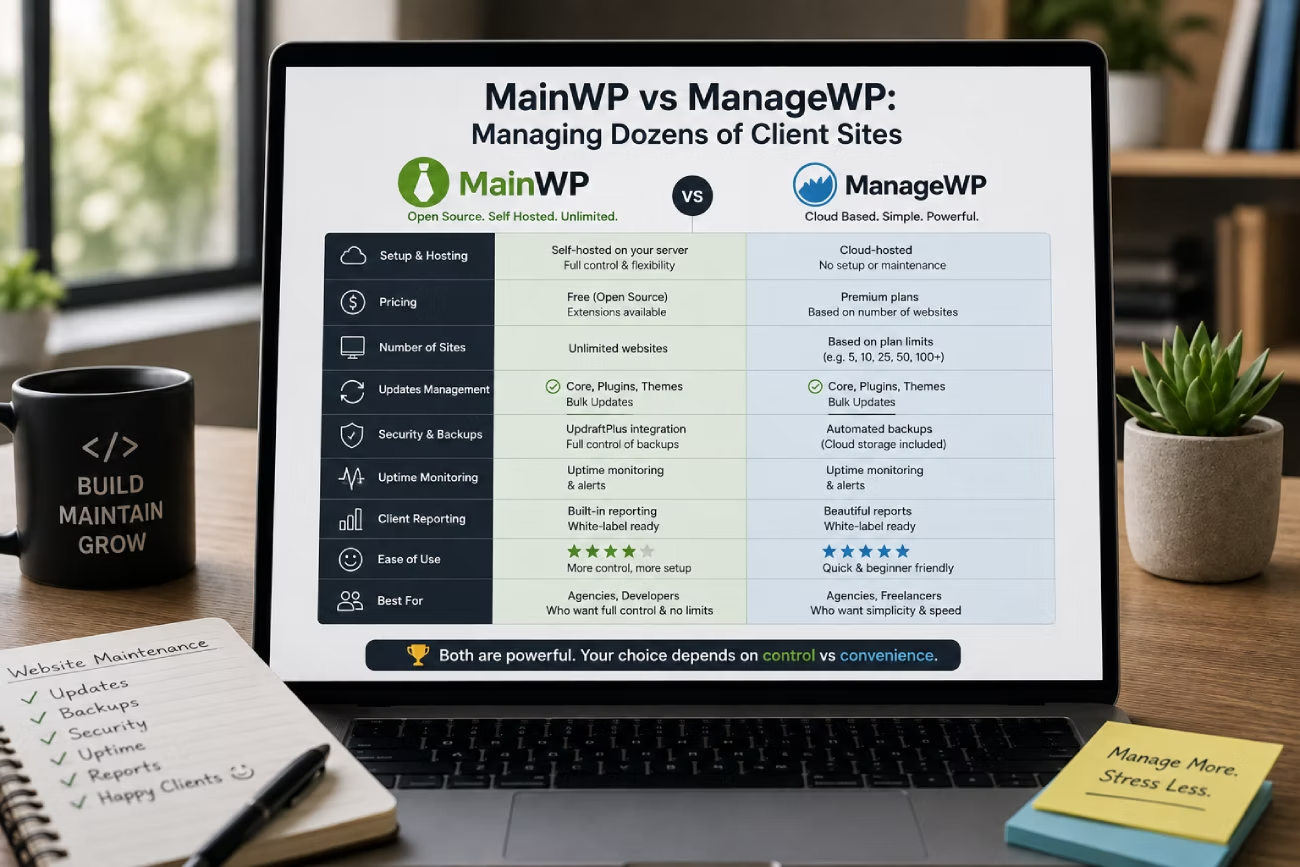
The first nine client sites feel manageable. You log in, run the updates, click around the homepage, log out. Then the tenth arrives, and the twentieth, and suddenly Tuesday morning is gone and you have not billed a minute of it. That is the moment most freelancers start comparing MainWP vs ManageWP, because both promise the same thing: one screen, every site, updates and backups and reports handled in bulk.
They get there in completely different ways, and the difference is not really about features. It is about who runs the software and who holds the data. This guide walks through the actual maths at 10, 25, 50 and 100 sites, then covers the parts that matter more than price once you are actually living in the dashboard every week.
The Quick Verdict
If you only read one section, read this one.
Pick ManageWP if you want a maintenance dashboard that simply works, you are under about 15 sites, or you would rather pay a monthly fee than run another server. Its update safety net is genuinely better than MainWP’s, and that alone is worth money.
Pick MainWP if you are running more than about 15 sites, you want a flat cost that does not grow with your client list, or you have contractual reasons to keep client data on infrastructure you control. You are trading money for time and responsibility.
The honest middle ground: MainWP is cheaper on paper almost immediately, but the saving disappears if the dashboard costs you more than roughly an hour and a half of admin a month. The rest of this article shows the working.
The One Difference Everything Else Flows From
ManageWP is software as a service. You create an account, install the ManageWP Worker plugin on each client site, and everything else runs on ManageWP’s servers. There is nothing for you to host, patch or back up.
MainWP is a plugin. You spin up a WordPress install of your own, put the MainWP Dashboard plugin on it, and install MainWP Child on each client site. The dashboard is now a website you own, with all the freedom and all the babysitting that implies. MainWP is explicit about this being the point, describing itself as software you “install on your own WordPress site not ours.”
Every other difference — pricing shape, data ownership, add-on costs, even how reliably scheduled jobs fire — is downstream of that single decision.
The Real Cost at 10, 25, 50 and 100 Sites
This is where most comparisons wave their hands. Here are the actual numbers, taken from both vendors’ own pricing pages.
What ManageWP Actually Costs
The base account is free on unlimited sites, and the free tier is not a token gesture: monthly cloud backups, one-click login, plugin and theme management, basic client reports and a security check are all included at no cost.
The money starts when you add the things a paying maintenance client expects. Per ManageWP’s pricing page, premium add-ons are billed per website per month, with a flat bundle price as an alternative:
- Backups: $2 per site, or $75 as a bundle
- Uptime Monitor: $1 per site, or $25 as a bundle
- Advanced Client Reports: $1 per site, or $25 as a bundle
- White Label: $1 per site, or $25 as a bundle
- Automated Security Check, Automated Performance Check, SEO Ranking, Link Monitor: $1 each per site, or $25 each as a bundle
- Vulnerability Protection: $2 per site
Each bundle covers up to 100 websites, and there is an all-in-one package at $150 a month that includes every bundle.
A realistic paid-maintenance stack is backups, uptime monitoring, advanced reports and white labelling — $5 per site per month, or $150 a month once you switch to bundles. Taking whichever is cheaper at each site count:
- 10 sites: $50/month — $600/year
- 25 sites: $125/month — $1,500/year
- 50 sites: $150/month — $1,800/year
- 100 sites: $150/month — $1,800/year
Notice the shape. Cost climbs steeply from 10 to 50 sites, then flattens completely, because the bundles cap out. ManageWP is at its most expensive per site right in the middle of the range, which is exactly where most growing freelancers sit.
What MainWP Actually Costs
MainWP’s pricing does not care how many sites you have. There is a free tier with the essential add-ons, and MainWP Pro at $29 monthly, $199 yearly, or $599 once for a lifetime licence. Every plan covers unlimited sites and includes all current and future Pro add-ons.
That is not the whole bill, though, and anyone telling you it is has skipped a step. The dashboard is a WordPress site, so it needs somewhere to live. Put it on shared hosting and it will crawl once it is polling fifty child sites. Budget for a small managed cloud server instead — entry-level plans start around $11 a month, or $132 a year — and keep it separate from any client site, which is also just good practice for the same reasons behind the hosting mistakes agencies keep making.
So MainWP Pro, billed yearly, on its own small server: $331 a year, at any site count. Offsite backup storage sits on top of that and depends entirely on how much data you keep, so treat it as a separate line rather than pretending it is free.
The Side-by-Side Numbers
| Sites | ManageWP (backups + uptime + reports + white label) | MainWP Pro yearly + small server |
|---|---|---|
| 10 | $600/year | $331/year |
| 25 | $1,500/year | $331/year |
| 50 | $1,800/year | $331/year |
| 100 | $1,800/year | $331/year |
If you run a leaner ManageWP stack — backups only, no uptime or white label — it looks much friendlier: roughly $240 a year at 10 sites, $600 at 25, and $900 at 50 or 100 once the backup bundle kicks in.
The breakeven points are worth memorising. Against a full maintenance stack, MainWP wins on cost from about six sites. Against a backups-only setup, it wins from about fourteen. Either way, the crossover arrives earlier than most people assume.
Over five years at 50 sites, ManageWP totals around $9,000. MainWP Pro on yearly billing totals about $1,655, and the lifetime licence plus five years of server costs comes to roughly $1,259. That is a gap of more than $7,000.
The Number That Flips the Answer Back
Here is the part the affiliate roundups leave out.
That $7,000 saving is spread across sixty months. At a modest $75 an hour, it buys about 98 hours of your time — roughly one hour and 38 minutes a month. If your self-hosted dashboard costs you more than that in updates, cron troubleshooting, storage configuration and the occasional afternoon spent working out why three child sites stopped reporting in, MainWP is not saving you anything. It is converting cash into unpaid labour.
Some people are comfortably under that number. Plenty of others are not. Be honest with yourself about which one you are before the spreadsheet makes the decision for you.
Who Holds Your Client Data
Both tools work by installing a connector plugin on every client site with administrator-level access. That is a lot of trust in one place, and it is worth understanding where that trust lands.
With MainWP, the connection runs between your server and the client’s. Nobody else is in the chain. If a client’s contract, or your own data processing agreement, requires you to name every third party that can reach their site, that list is short.
With ManageWP, credentials and site data live on ManageWP’s infrastructure. The company was acquired by GoDaddy in 2016 and has operated as part of it ever since. For most freelancers this is a complete non-issue — GoDaddy is a large, established hosting company. For anyone working with clients in regulated sectors, or clients who ask pointed questions about subprocessors, it is a conversation you will have to have.
One thing neither model avoids: a compromised dashboard means a compromised portfolio. Whichever you choose, put two-factor authentication on it, keep the connector plugin current on every site, and never reuse the password anywhere else.
Client Reporting: What You Can Actually Send
Reporting is the feature that justifies a maintenance retainer, so price it properly.
ManageWP includes basic client reports on the free tier. Anything that looks like a professional deliverable — scheduled sending, custom branding, your logo instead of theirs — means Advanced Client Reports at $1 per site and White Label at another $1. On 40 sites that is $80 a month, or $960 a year, purely to make reports look like they came from you.
MainWP handles this through the Pro Reports add-on, which is bundled into the Pro licence at no extra charge. It is more configurable and correspondingly fiddlier: you will spend an evening building a template, and then it runs forever. If you are already selling maintenance under your own brand — the same instinct behind white-label and reseller hosting — having branding included rather than metered is a real structural advantage.
Uptime Monitoring
ManageWP’s Uptime Monitor is a $1 per site add-on, or $25 as a bundle. It is built in, it just works, and there is nothing to configure.
MainWP ships an Advanced Uptime Monitor Integration free to all users, but the word *integration* is doing real work in that name. It surfaces uptime data inside your dashboard, and it requires an API key from a supported third-party service such as UptimeRobot, Better Uptime, NodePing or Site24x7. Free tiers at those services cover a decent number of monitors, so the cost often really is zero — but it is a second account to set up and a second thing that can break.
This pattern repeats across both products. MainWP tends to be free and assembled; ManageWP tends to be paid and finished.
Bulk Updates That Don’t Break Sites
This is the most important section in the article, and it is the one place where the two tools are genuinely not equivalent.
ManageWP’s Safe Updates creates a full restore point, checks the target page returns a 200 status, takes a *before* screenshot, applies the update, re-checks the HTTP status, and rolls back automatically if it sees a 4xx or 5xx error. It then shows you before-and-after screenshots side by side. Safe Updates is included free with the premium Backup add-on, and free outright on GoDaddy-hosted sites.
MainWP’s rollback works differently, and the distinction matters. Per MainWP’s own documentation, version 5.1 introduced rollback for plugin and theme updates on WordPress 6.3 and above. It is active automatically wherever updates run, and it restores the previous version when an update *fails*. What it does not do is roll back an update that installed perfectly and then broke the site, and MainWP states plainly that it does not support on-demand rollback to a previous version.
Read those two paragraphs again, because that is the whole difference. MainWP catches a failed installation. ManageWP catches a successful installation with a broken result. The second failure mode is the one that costs you a client, and it is far more common — a plugin updates cleanly and takes the checkout page or the contact form with it.
If you go the MainWP route, close that gap yourself. Wire up a backup extension that snapshots before updating, stagger releases so a bad plugin version hits three sites rather than fifty, and test the heavy dependencies — commerce, membership, form builders — on a proper staging environment first.
The other half of safe bulk updating has nothing to do with either tool: standardise your stack. Bulk updates are only safe when every site is running the same small set of plugins you actually know the behaviour of, which is why building a default plugin set you install on every project pays for itself. Fifty sites running the same caching layer — WP Rocket, say — is one update you can reason about. Fifty sites running eleven different caching plugins is a lottery.
Where Each One Will Annoy You
Neither tool is a clean win, and pretending otherwise helps nobody.
MainWP’s rough edges. The dashboard is another WordPress site you are responsible for keeping updated and secure. Scheduled tasks depend on cron firing reliably, which on a quiet, under-powered server is not guaranteed. Backups need you to choose an extension and connect your own storage. The interface is dense — powerful, but nobody has ever called it elegant, and the learning curve is real. And when something goes wrong at 11pm, there is no support team who can see your dashboard, because your dashboard is yours.
ManageWP’s rough edges. Costs are metered per site, so growth is a bill. Basic features like white labelling and uptime monitoring, which arguably ought to be included, each carry a charge. You are dependent on a third party’s uptime and roadmap for a system that touches every client you have. And the free tier’s monthly-only backup cadence is not adequate for any site that takes orders or bookings, which means the $2 backup add-on is effectively mandatory rather than optional.
Best For X
Under 10 sites, side projects and early freelancing: ManageWP free, plus the $2 backup add-on where a site actually matters. Under $250 a year and nothing to maintain.
10 to 25 sites, growing but time-poor: ManageWP still, if your hours are worth more than the difference. This is the range where the per-site pricing bites hardest, so review it every quarter.
25 to 100 sites, a real maintenance product: MainWP Pro. The flat cost is transformative when every new client used to add $60 a year to the tooling bill, and included white-label reporting removes a per-site charge you were paying purely for branding. Pair it with hosting that scales as the agency grows.
Data-sensitive or contractually restricted clients: MainWP, effectively by default. Self-hosting is the only version of this that survives a subprocessor conversation.
You are the only technical person and you hate servers: ManageWP, at any site count. Pay the money. A dashboard you neglect is worse than a dashboard that costs too much.
The Recommendation
For most freelancers reading this, the answer is sequential rather than binary. Start on ManageWP’s free tier, add backups where they matter, and let it carry you to about fifteen sites without a thought. Somewhere past that, the per-site bill starts looking silly next to a flat $199 a year, and that is the moment to stand up a MainWP dashboard on its own small server and migrate over a weekend.
What you should not do is move for the money alone and then skip the work that makes self-hosting safe. MainWP without pre-update backups, without staggered releases and without a standardised plugin stack is more dangerous than ManageWP with all its add-ons switched off. The licence is the cheap part. The discipline is what you are actually buying.
And whichever you land on, the dashboard is one component of a larger system. It sits alongside your hosting, your builder and your billing in the wider toolkit freelance designers rely on — pick the one that fits how you already work, not the one with the better comparison table.
Frequently Asked Questions
Is MainWP or ManageWP cheaper for 50 client sites?
MainWP is significantly cheaper at 50 sites. MainWP Pro is $199 a year for unlimited sites, plus roughly $132 a year for a small cloud server to host the dashboard — about $331 a year in total. A comparable ManageWP stack of backups, uptime monitoring, advanced client reports and white labelling costs about $150 a month, or $1,800 a year, at that site count. The gap is over $1,400 a year, but MainWP requires you to run and maintain the dashboard yourself.
Can I use MainWP and ManageWP for free?
Both have real free tiers. MainWP’s free plan covers unlimited sites with its essential add-ons, but you still need somewhere to host the dashboard. ManageWP is free on unlimited sites and includes monthly cloud backups, one-click login, plugin and theme management and basic client reports, with premium features charged per site. The free tiers are genuinely usable; the paid tiers are about reporting, backup frequency and branding.
Where is my client data stored with ManageWP?
ManageWP stores site data and credentials on its own infrastructure. The company was acquired by GoDaddy in 2016 and has operated as part of GoDaddy since. For most freelancers this is not a concern, but if a client contract requires you to disclose every third party with access to their site, ManageWP has to be named. MainWP avoids this because the dashboard runs on a server you control.
Does MainWP have anything equivalent to ManageWP Safe Updates?
Not equivalent. MainWP 5.1 added automatic rollback for plugin and theme updates on WordPress 6.3 and above, which restores the previous version when an update fails, and MainWP states it does not support on-demand rollback to a previous version. ManageWP Safe Updates goes further: it creates a restore point, checks the HTTP status before and after, rolls back automatically on a 4xx or 5xx error, and shows before-and-after screenshots. MainWP catches failed installs; ManageWP catches installs that succeed but break the site.
Do I need separate hosting for a MainWP dashboard?
Effectively yes. MainWP runs as a plugin on a WordPress install you provide, and that install should be separate from any client site. Shared hosting struggles once the dashboard is polling dozens of child sites, so an entry-level cloud server — around $11 a month — is the realistic minimum. Always include this in your cost comparison, because it is the line people forget.
How many sites do I need before switching from ManageWP to MainWP?
Around six sites if you are paying for a full ManageWP stack of backups, uptime, advanced reports and white labelling, and around fourteen if you only pay for backups. Those are the points where MainWP’s flat $331 a year becomes cheaper. Cost is not the only factor, though: below about fifteen sites the time you spend maintaining a self-hosted dashboard usually outweighs the money you save.
Is it safe to run bulk plugin updates across dozens of client sites?
Only with guardrails. Take a restore point before updating, stagger releases so a bad plugin version reaches a handful of sites rather than all of them, and test heavy dependencies like commerce, membership and form plugins on staging first. Standardising your plugin stack across every client site matters more than the dashboard you use, because bulk updating is only predictable when every site is running software you already understand.
Ready to stop logging into sites one at a time? Start with if you want a maintenance dashboard running this afternoon with nothing to host, or if you would rather own the infrastructure and cap your tooling costs for good. Whichever you choose, put it on a server of its own before you connect your first client site.
Need a WordPress developer?
Let's build something fast, scalable, and SEO-ready — from a custom theme to a full headless stack.
Get in Touch