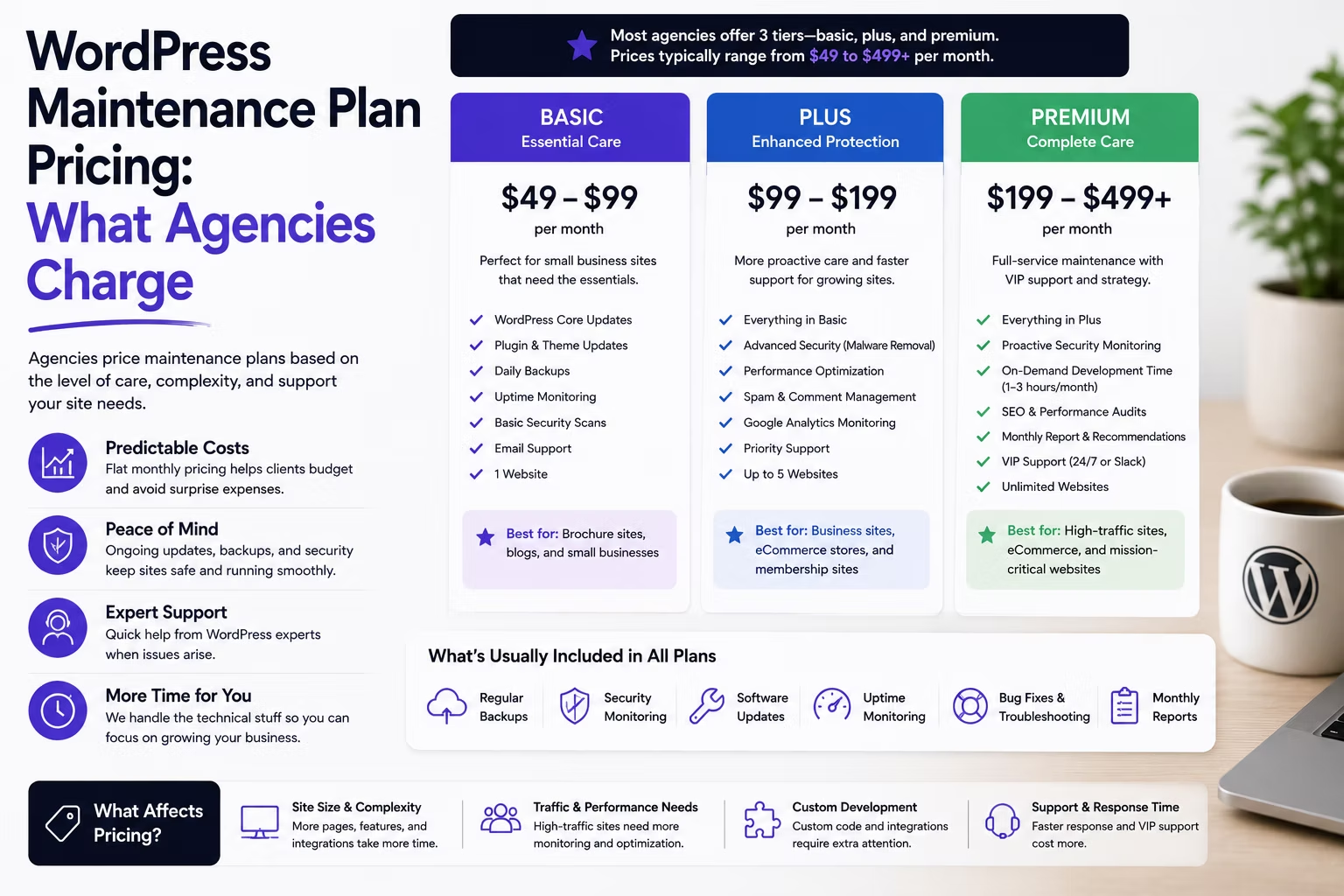
Most freelancers set WordPress maintenance plan pricing by guessing. They open three competitor pages, pick a number somewhere in the middle, and hope it covers the work. Then the plugin conflicts start, the “quick little edits” pile up, and a plan that looked like easy recurring revenue quietly starts losing money.
Disclosure: some links in this article are affiliate links. If you buy through them we may earn a commission at no extra cost to you. It does not change what we recommend.
This guide works the other way round. You start with what one site genuinely costs you to keep alive each month, add the hours you really spend, and only then set a price. You get a three-tier structure, a cost-base breakdown, the margin maths, a hard exclusion list that stops scope creep, and a plan for raising prices on clients who have paid the same fee since 2022.
The quick answer
If you want numbers before the reasoning, here is the model this article builds:
- Entry care plan: $79–$99 per site, per month
- Standard plan (where most small-business clients belong): $149–$199
- Priority plan: $299–$399
- eCommerce, membership or multisite: $500 and up, quoted per site
Underneath those prices, your tooling and hosting typically run $20–$55 per site per month. Labour is everything else, and labour is what kills badly priced plans.
One honest caveat before you copy those figures: they are a reasoned model built from a real cost base, not a survey statistic. There is no independent, audited study of what web agencies charge for WordPress maintenance. Almost every “average price” you will find online is published by a company that sells maintenance and has an interest in where the anchor sits. Treat those pages as marketing, and build your own number from your own invoices.
Start with the cost base, not the competition
You cannot price a retainer you have not costed. Before you pick a tier price, write down every recurring cost that a single client site drags along with it.
Here is the structure, with illustrative monthly figures per site. Substitute your own invoices — the point is the shape of the model, not these exact numbers.
| Cost line | Typical range per site/month | Notes |
|---|---|---|
| Hosting (share of an agency plan) | $8–$25 | Cheaper per site as you consolidate |
| Offsite backups | $2–$5 | Must be independent of the host |
| Security and vulnerability monitoring | $2–$6 | Scanning, patching alerts, firewall |
| Uptime monitoring | $0–$2 | Often free at low check volumes |
| Plugin and theme licences | $5–$15 | Amortised across the sites that use them |
| Management dashboard | $1–$3 | Bulk updates and reporting |
| Tooling subtotal | $18–$56 | Before a single minute of labour |
Hosting
Hosting is usually your largest fixed line, and the one with the most room to improve. Buying per site on a retail plan is the expensive way to do it. Buying server capacity and packing several client sites onto it changes the maths completely, which is why platforms like Cloudways suit agencies holding ten or more sites.
Decide early whether you are billing hosting inside the plan or passing it through at cost. Both work. What does not work is absorbing an unpredictable bill, so understand the difference between pay-as-you-go and fixed cloud pricing before you commit to a flat monthly fee. If you want hosting to become a profit centre rather than a cost, look at white-label reseller hosting for agencies instead of reselling someone else’s brand at a thin markup.
Backups
A backup is only real if it lives somewhere your host does not control, and if it covers both halves of the site. WordPress documentation is explicit that there are two parts to a backup — the database and the files — and that you need both to fully restore a site. A host snapshot that dies with the server is not a backup strategy; it is a convenience feature.
Budget for a dedicated offsite backup service with real restore testing.
Security
Security in a maintenance plan means three concrete things: keeping core, plugins and themes patched; monitoring for known vulnerabilities in what is installed; and applying the baseline hardening measures WordPress itself documents in its hardening guide. Anything beyond that — malware cleanup after a breach, forensic work, rebuilding a hacked site — is a paid emergency, not an inclusion. More on that below.
Uptime monitoring
Cheap, and the single easiest thing to promise. Five-minute checks with alerting cost little to nothing at small volumes, and give you the response-time evidence you will want the first time a client says “the site was down all weekend”.
Licences
This is the line most people underestimate, because licences are billed annually and maintenance is billed monthly. Divide every annual licence by twelve, then by the number of client sites it covers, and put the result in the plan.
A performance licence such as WP Rocket is a good example: an unlimited-site licence is trivial per site across a portfolio and painful across three. If you are still deciding whether paid caching earns its place in the plan at all, the paid versus free caching comparison settles it faster than testing yourself. The same amortisation logic applies to builders, form plugins and premium add-ons — the mechanics are covered in this guide to pricing and licensing WordPress themes and plugins. A form plugin licence behaves exactly the same way, so check what an agency tier costs on the WPForms pricing page before you divide it across client sites.
Labour, the line everyone forgets
Tooling is predictable. Labour is not, and it dwarfs everything above.
A realistic entry plan consumes 30–60 minutes per site per month once you include update runs, a visual check, backup verification and the monthly report. At an internal cost of $40 an hour, that is $20–$40 — more than your entire tooling bill.
The three tiers, and what goes in each
Three tiers is the sweet spot. Two gives clients nothing to compare. Five paralyses them.
| Essential | Standard | Priority | |
|---|---|---|---|
| Price per month | $79–$99 | $149–$199 | $299–$399 |
| Core, plugin, theme updates | Monthly | Every two weeks | Weekly |
| Offsite backups | Daily | Daily | Daily + pre-update |
| Uptime monitoring | 5-minute checks | 5-minute checks | 1-minute + alerting |
| Security monitoring | Yes | Yes | Yes + firewall rules |
| Staging test before updates | No | Yes | Yes |
| Content edit time | None | 30 min/month | 2 hours/month |
| Performance monitoring | No | Quarterly | Monthly |
| Reporting | Monthly email | Monthly report | Monthly report + call |
| Response time | 3 business days | 1 business day | Same business day |
Three rules make this table work.
Every tier must be profitable on its own. The entry plan is not a loss leader. If $79 does not clear your cost base plus a margin you would accept forever, the entry price is $99 or $129.
The upgrade trigger is time, not features. Clients do not buy “weekly updates”. They buy “you fix it the same day” and “I get half an hour of edits without emailing you a purchase order”. Response time and included hours are what move people up a tier.
Staging is the real dividing line. Testing updates on a copy before touching production is the difference between maintenance and gambling. That is a workflow decision as much as a pricing one, and it depends on having hosting with proper staging and client access underneath the plan.
For the top tier, performance is a genuine deliverable rather than a checkbox. If you are promising monthly performance monitoring, you should be reporting against Core Web Vitals and know what the numbers mean, which the guide to Core Web Vitals for WordPress covers in practical terms. Premium tiers also justify premium infrastructure — a managed platform like Kinsta is easy to defend at $349 a month and hard to defend at $79.
The margin maths
Run the numbers on the entry tier, because that is where plans fail.
Essential plan at $79:
- Tooling: $25
- Labour: 45 minutes at $40/hour internal cost = $30
- Total cost: $55
- Gross margin: $24, or about 30%
Thirty per cent sounds survivable until one client emails twice. Two unbilled support replies wipe the month out.
Now the same plan at $99 with tooling driven down to $18 by consolidating hosting and licences across a portfolio:
- Total cost: $48
- Gross margin: $51, or about 52%
Same work, more than double the profit. That gap comes from two levers only: charging enough at the entry point, and spreading fixed costs across more sites.
Standard plan at $179:
- Tooling: $30
- Labour: 90 minutes at $40/hour = $60
- Total cost: $90
- Gross margin: $89, or about 50%
Aim for 50–60% gross margin on maintenance. Below 40%, one difficult client makes the whole line unprofitable. Above 70%, you are almost certainly under-delivering and will lose the client the first time something breaks.
Set your entry price where 20 sites produce real money. Twenty sites at $99 with 50% margin is roughly $990 a month of gross profit for predictable, batchable work. That is the number worth building toward.
What to exclude, in writing
Scope creep does not arrive as a big request. It arrives as “while you’re in there, could you just…”. The fix is an exclusions list in the agreement, phrased as a positive: these things are available, they are simply billed separately.
Exclude by default:
- New pages, new templates, new features. Edits to existing content are maintenance. New builds are projects.
- Design changes. Swapping an image is an edit. Restyling a section is design work.
- Content writing. Publishing content the client supplies is fine. Writing it is not.
- SEO campaigns. Keeping the SEO plugin updated is maintenance. Strategy, content and link work are a separate retainer.
- Migrations and redesigns. Moving hosts or rebuilding the site is quoted per project.
- Malware cleanup and hack recovery. Prevention is included. Remediation is billed hourly, with a stated rate.
- Third-party breakage. If a payment gateway or CRM changes its API, diagnosis is included; rebuilding the integration is not.
- eCommerce operations. Product uploads, order troubleshooting and stock management are commerce support, not maintenance.
- Major version upgrades of custom code. A bespoke theme or plugin needing a rewrite for a new PHP release is project work.
That last one is worth a sentence, because it is where maintenance plans meet a real deadline. PHP branches are supported for a fixed window — php.net publishes the exact end-of-life dates, and once a branch is past them it receives no security fixes at all. Keeping a site on a supported PHP version is squarely maintenance. Rewriting custom code so it survives the jump is not, and saying so upfront turns an awkward conversation into a scheduled, billable piece of work.
Add one line that covers everything you did not think of: *anything not listed as included is quoted before work begins.* Then actually quote it. The plans that bleed are the ones where the exclusion exists on paper and gets waived every month.
How to raise prices on existing clients
Most maintenance plans are underpriced because they were priced years ago, by a less experienced version of you, for a smaller site. Fixing that is a process, not an email.
1. Fix new-client pricing first. Never raise an existing client to a number you are not already selling. Set the new rate, sell it to two or three new clients, and let it become the real price before you go back to anyone.
2. Give 60 days’ notice, in writing. Thirty days feels like an ultimatum. Sixty reads as respect and gives the client a budget cycle to absorb it.
3. Lead with what changed, not with inflation. “Costs have gone up” invites negotiation. “The plan now includes daily offsite backups, staging-tested updates and same-day response, and the price is moving from $99 to $149” is a different conversation. Add something real, even something small, so the increase carries value.
4. Show the year. Send the twelve-month record before you send the new price: uptime percentage, updates applied, vulnerabilities patched, backups verified, issues resolved. Clients forget maintenance is happening precisely when it is working. The report is the argument.
5. Move people to tiers, not to a new number. “You are currently on Essential; based on what we handled this year, Standard fits you better” is an upgrade. A raw percentage increase is a price rise. The first converts far better than the second.
6. Offer annual prepay as the cushion. Twelve months at ten months’ price softens the increase, improves your cash position, and locks the relationship in. Some clients take it purely to avoid thinking about it again.
7. Expect to lose one or two, and let them go. A small amount of churn on a price rise is normal and usually healthy — the clients who leave over $50 are typically the ones consuming the most unbilled support. If nobody objects at all, you did not raise enough.
Do this once a year on a fixed date. Annual, expected, modest increases are painless. A single 80% correction after four frozen years is not.
Five pricing mistakes worth avoiding
1. Pricing against the cheapest provider you can find. There is always someone at $29 a month running an automated update script with no human review. You are not selling the same thing, so stop bidding against it.
2. Bundling unlimited edits. “Unlimited” attracts exactly the clients who will test it. Cap the hours and sell overflow.
3. Forgetting annual licences. Divide by twelve and put them in the plan, or you fund them out of margin every renewal.
4. Charging per hour for maintenance. Hourly billing punishes you for getting efficient and gives the client an unpredictable bill. Flat monthly fees suit both sides.
5. Never reviewing the plan. A site that has doubled in pages and added a booking system is no longer the site you quoted. Re-scope annually.
The recommendation
Set your entry plan at $99, not $79. The extra $20 costs the client almost nothing and roughly doubles your margin on the tier that carries the most volume — and it gives you room to absorb the occasional support email without resentment.
Put most clients on a $179 Standard plan with staging-tested updates, 30 minutes of included edits and one-business-day response. Reserve the $349 Priority tier for sites that generate revenue directly, where downtime has a number attached and same-day response is worth paying for. Quote eCommerce separately, always.
Then hold three habits: consolidate hosting and licences so your fixed costs fall as your portfolio grows, keep the exclusions list in the contract and actually enforce it, and review pricing on the same date every year.
Maintenance done properly is the most predictable revenue a small agency can build. It only works if the price starts above the cost — and the only way to know that is to do the arithmetic first.
Frequently Asked Questions
How much should I charge for a WordPress maintenance plan?
Price from your cost base, not from competitors. Tooling and hosting typically cost $18-$56 per site per month, and labour adds $20-$60 more depending on the tier. A workable structure is $99 for an entry plan, $149-$199 for a standard plan and $299-$399 for a priority plan, with eCommerce quoted separately. Aim for 50-60% gross margin on every tier.
What should be included in a WordPress maintenance plan?
The baseline is core, plugin and theme updates, daily offsite backups covering both files and the database, security and vulnerability monitoring, uptime monitoring, and a monthly report. Higher tiers add staging-tested updates, included content edit time, performance monitoring and faster response times.
Should hosting be included in the maintenance fee?
Either approach works, provided you have costed it. Bundling hosting simplifies the client’s billing and lets you keep the margin, but only if you are buying capacity in bulk rather than a retail plan per site. Passing hosting through at cost is safer when the site has unpredictable traffic. What fails is absorbing a variable hosting bill inside a flat monthly fee.
What should I exclude from a WordPress maintenance plan?
Exclude new pages and features, design changes, content writing, SEO campaigns, migrations and redesigns, malware cleanup after a breach, rebuilding broken third-party integrations, eCommerce operations, and any rewrite of custom code required by a major platform upgrade. List them in the agreement and add a catch-all line stating that anything not listed as included is quoted before work begins.
How do I raise prices on existing maintenance clients?
Sell the new rate to new clients first, then give existing clients 60 days’ written notice. Lead with what has been added to the plan rather than with rising costs, send a twelve-month record of uptime, updates and issues resolved before you send the new price, and frame the change as a move to a better-fitting tier. Offering annual prepay at a discount softens the increase. Expect a small amount of churn and treat it as normal.
Is a WordPress maintenance plan actually profitable?
Yes, but only above a price floor. At $79 a month with $25 of tooling and 45 minutes of labour, gross margin is roughly 30%, which two unbilled support emails can erase. At $99 with consolidated hosting and licences bringing tooling down to $18, margin is closer to 52% for the same work. Profitability comes from charging enough at the entry tier and spreading fixed costs across a larger portfolio.
Should I bill maintenance monthly or annually?
Offer both. Monthly billing lowers the barrier to signing up and suits most small-business clients. Annual prepay, typically priced at ten or eleven months, improves cash flow, reduces churn and is a useful cushion when you raise prices. Avoid hourly billing for maintenance entirely, since it penalises efficiency and gives the client an unpredictable invoice.
Working out your own numbers? Start by pinning down the two lines that move the most: hosting and licences. Consolidate both across your portfolio and the entry tier stops being marginal. Browse the agency hosting and tooling guides on the blog to price your cost base with real figures instead of estimates.
Need a WordPress developer?
Let's build something fast, scalable, and SEO-ready — from a custom theme to a full headless stack.
Get in Touch