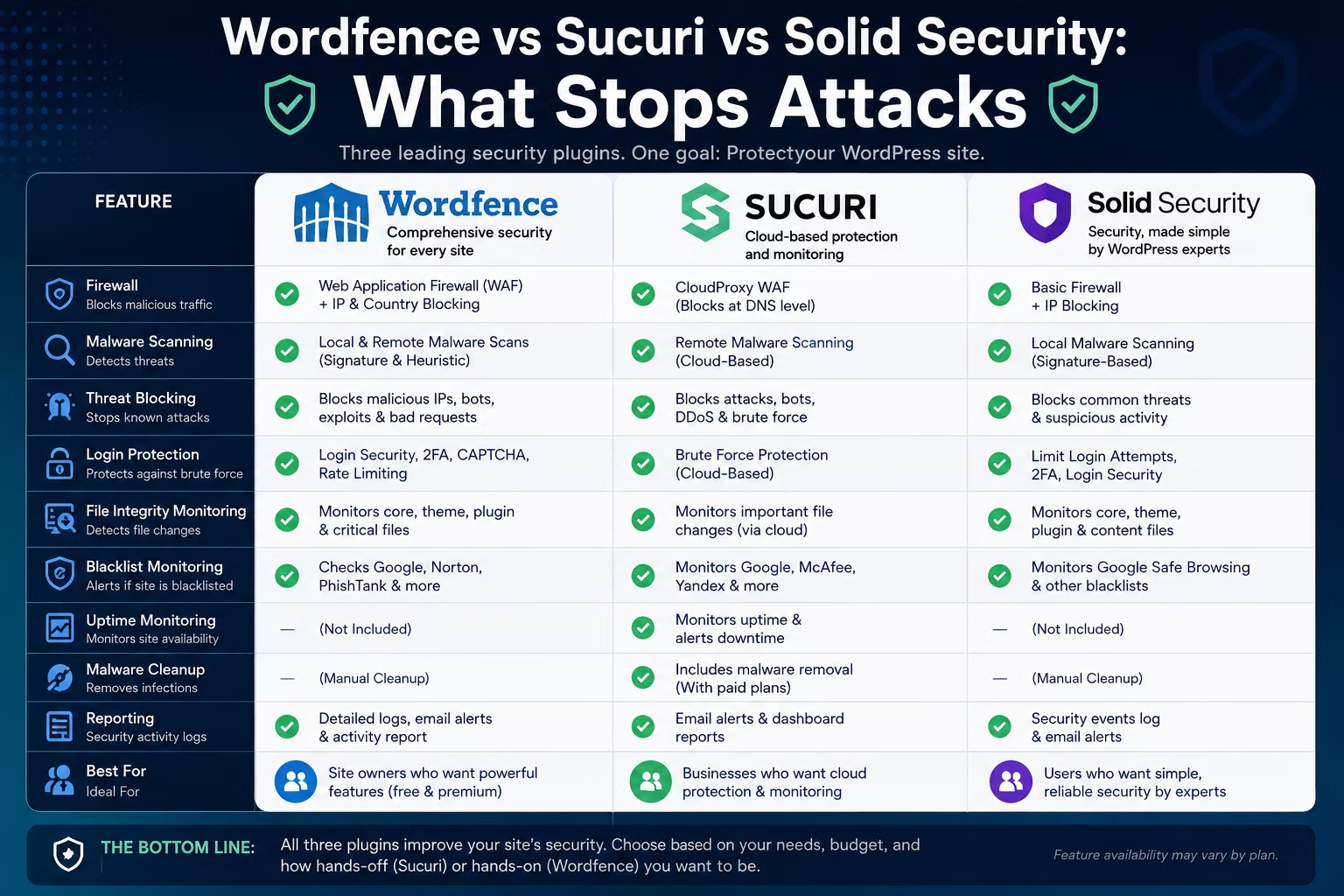
Every WordPress security plugin comparison you have read ends the same way: three feature tables, three green tick columns, and no real answer. The problem is that a tick next to “firewall” tells you nothing about *where* that firewall sits, and a tick next to “malware scanner” tells you nothing about whether anyone cleans the mess up afterwards.
If you build sites for clients, that distinction is your problem, not theirs. So this comparison of Wordfence vs Sucuri vs Solid Security is organised around one question: what does each product actually stop, and what does it only tell you about after the fact?
Disclosure: some links in this article are affiliate links. If you buy through them we may earn a commission at no extra cost to you. It does not change what we recommend.
One housekeeping note before we start, because it trips people up. Solid Security has been rebranded. The plugin still listed on WordPress.org under the old `better-wp-security` slug now ships as Kadence Security, published by Nexcess, and solidwp.com now redirects into Liquid Web’s Kadence product line. It is the same lineage that started as iThemes Security. Most articles you will find still call it Solid Security, so that is the name used here, with the new one noted where it matters.
The quick verdict
If you want the short version:
- Sucuri is the only one of the three that stops malicious traffic before it reaches your server, and the only one that includes hands-on malware cleanup. It is also the most expensive and the most disruptive to set up.
- Wordfence gives you the most protection per pound inside WordPress itself, plus the best free tier and a genuinely useful free multi-site dashboard. It costs you server resources to run.
- Solid Security is a hardening and login-security tool with vulnerability patching bolted on. It is the lightest of the three, and it is not a general-purpose firewall.
None of them prevents a hack. They reduce the number of ways in and shorten the time it takes you to notice. Anyone selling you more certainty than that is selling.
Blocking and reporting are not the same thing
This is the whole article in one section, so it is worth being precise.
Blocking means a malicious request is refused before it can do anything. Somewhere in the chain, something inspects the request, decides it looks like an attack, and returns an error instead of running the code.
Reporting means the request already ran. Something changed on disk or in the database, and a scanner noticed afterwards. That is still valuable, because unnoticed infections are the ones that get sites blocklisted. But it is detection, not prevention, and the marketing rarely separates the two.
The component that does the blocking is a web application firewall. OWASP defines a WAF as a layer that inspects HTTP traffic and applies rules to filter out malicious requests. All three products in this comparison talk about firewalls. Only two of them have one in any conventional sense, and those two put it in completely different places.
Side-by-side comparison
| Wordfence | Sucuri | Solid Security (Kadence Security) | |
|---|---|---|---|
| Firewall type | Endpoint WAF, runs in PHP on your server | Cloud WAF, runs on Sucuri’s network | No general-purpose WAF |
| Where it blocks | After the request reaches your host | Before the request reaches your host | Inside WordPress, rule-specific |
| Setup change required | Plugin install, optional server config file | DNS A record change | Plugin install only |
| Malware scanning | Yes, server-side file and database scan | Yes, plus remote scanning | File change detection |
| Malware cleanup | No, detection only | Yes, included on paid platform plans | No |
| Vulnerability patching | Firewall rules from the threat feed | Cloud WAF virtual patching | Patchstack virtual patching |
| Free tier | Full firewall and scanner, delayed rules | Auditing, scanning, hardening only | Core hardening and login security |
| Server resource cost | Highest of the three | Lowest, filtering happens off-site | Low |
| Multi-site dashboard | Wordfence Central, free | Sucuri dashboard, paid | Kadence Central, paid |
| DDoS mitigation | No, traffic still hits your server | Yes, absorbed at the network edge | No |
Where the firewall sits is the whole argument
Forget feature lists for a moment. There are only three architectural positions available, and each product picks one.
Endpoint: inside your server, in PHP
Wordfence runs on your own server as PHP code. In its default state it loads like any other plugin, which means WordPress has already started booting by the time the firewall gets a look at the request. To improve on that, Wordfence documents an extended protection mode that sets PHP’s `auto_prepend_file` directive so the firewall loads before WordPress does. That is done by writing to `.htaccess`, `.user.ini` or `php.ini`, depending on the server.
The upside is that an endpoint firewall sees the request exactly as your application sees it. It knows which user is logged in, which plugin is being called, and what the request is really trying to do. Cloud firewalls have to infer all of that.
The unavoidable downside is that the request already arrived. Your server accepted the connection, spun up PHP and spent resources deciding to say no. Under a volumetric attack, that is still load you are paying for.
Cloud: in front of your server, at DNS level
Sucuri takes the opposite approach. Its firewall is, in its own documentation, “a cloud-based protective layer, that does not require any installation or modification to your server.” You point your DNS A record at Sucuri’s IP addresses, and all traffic to your site is routed through their network first. Clean traffic is passed through; the rest never reaches you.
Structurally this is a reverse proxy, and it behaves much like the CDN layer sitting in front of a cached site — same position in the chain, different job. Because filtering happens off your infrastructure, your server load actually goes *down* during an attack instead of up.
The costs are real. You are handing DNS control to a third party, adding a hop to every request, and creating a dependency: if the proxy has a bad day, so does every client site behind it. You also need to lock down your origin server, because anyone who learns your real IP can bypass the firewall entirely by connecting directly.
Neither: hardening and targeted patches
Solid Security does not put a general-purpose WAF anywhere. It works inside WordPress through PHP hooks and some server configuration it writes during setup. What it does instead is reduce the number of doors: enforced password policies, two-factor authentication, brute force protection, file change detection, and blocking the specific WordPress behaviours attackers rely on.
On top of that sits Patchstack integration, which supplies virtual patches. When a vulnerability is disclosed in a plugin you have installed, a rule is applied that blocks exploitation of *that specific flaw* until the developer ships a fix. That is genuine blocking, but it is narrow by design. It only covers known, catalogued vulnerabilities.
That is less limiting than it sounds. Most successful attacks reuse already-disclosed vulnerabilities rather than inventing new ones, which is the entire premise behind public catalogues like CISA’s Known Exploited Vulnerabilities list. A tool that reliably closes known holes is doing useful work.
Wordfence: an endpoint firewall inside WordPress
Wordfence is the default choice for a reason. The free version is not a demo — it includes the full firewall, the malware scanner, login security and two-factor authentication.
The catch is the threat feed. Free installs receive new firewall rules and malware signatures on roughly a thirty-day delay behind paying customers. That delay lands squarely in the window when a freshly disclosed vulnerability is being exploited hardest. For your own portfolio site that may be an acceptable risk. For a client site running an e-commerce checkout, it is harder to justify. The paid tier also adds a maintained IP blocklist and country blocking.
What it genuinely blocks: SQL injection attempts, malicious file uploads, known exploit patterns from the rule feed, brute force login attempts, and rate-limited crawlers.
What it only reports: existing infections. The scanner will tell you a file has been modified, that a plugin has a known vulnerability, or that your site appears on a blocklist. It will not clean anything up. If a client site is compromised, remediation is your weekend.
The honest downside: it is the heaviest of the three. The firewall loads on every request and the scanner is CPU-hungry, which shows up fastest on cheap shared hosting. Live traffic logging is the usual culprit when a site slows down after installing it, and it is the first thing to switch off.
Sucuri: a cloud firewall in front of your server
Sucuri is best understood as two separate things that share a brand, and conflating them is the most common mistake in this comparison.
The free Sucuri plugin is not a firewall. It is an auditing tool, a file integrity monitor, a remote scanner and a hardening panel. It is decent at what it does. It blocks essentially nothing.
The Sucuri platform is the paid cloud service described above, and it is a different category of product. Traffic is filtered before it reaches you, which means it is the only option here that meaningfully mitigates DDoS traffic, because the flood is absorbed on their network.
The feature agencies actually buy it for is cleanup. Paid platform plans include unlimited malware and hack removal — a human team logs in, removes the infection and handles blocklist removal requests. Response time varies by tier, and faster tiers cost more.
Work out what that is worth to you. If a compromised client site costs you a day of unbilled emergency work, an incident or two a year covers the subscription. If you have never cleaned up an infection and do not want to learn under pressure, the calculation is even simpler.
The honest downsides: it is the most expensive of the three, the DNS change is a real migration step you have to plan and can break things if the client’s DNS lives somewhere you do not control, and the free plugin’s name does a lot of misleading work.
Solid Security is now Kadence Security
This is the part most comparison articles have not caught up with. The product formerly sold as Solid Security — and as iThemes Security before that — now ships as Kadence Security under the Liquid Web and Nexcess umbrella. The WordPress.org listing was renamed, and Solid Central, the multi-site dashboard, is now Kadence Central.
If you have client sites running it, nothing broke. But rebrands change roadmaps, support channels and licence terms, and it is worth knowing before you standardise twenty sites on it.
The product itself is the lightest of the three and the friendliest to set up, with a guided wizard that gets a site to a sensible baseline in a few minutes. If your security problem is weak passwords, no 2FA and unattended login endpoints — which describes a large share of small business sites — it addresses the actual risk with almost no overhead.
What it genuinely blocks: brute force and credential attacks, logins without a second factor, and exploitation of specific catalogued vulnerabilities through virtual patching.
What it only reports: file changes, and vulnerable plugin versions.
The honest downside: there is no broad request filtering. A novel attack pattern with no Patchstack rule behind it will pass straight through to WordPress.
The performance cost nobody puts on the pricing page
Scanning is not free. A server-side malware scanner reads every file on disk and hashes it, which is a genuine CPU and I/O load. On a constrained shared plan, that can be the difference between a site that responds and one that times out — and it is a common reason a site feels slow even after you have optimised everything else.
The ranking is straightforward. Sucuri’s platform is lightest on your server, because the filtering happens somewhere else entirely. Solid Security is light because it does less. Wordfence is heaviest, because it runs a firewall on every request and a full scanner on a schedule.
Three things actually help:
1. Schedule scans for genuinely quiet hours, and stop assuming the default is fine.
2. Turn off live traffic logging. It writes a database row per visit and is the single most common cause of a Wordfence-related slowdown.
3. Stop trying to solve a CPU problem with plugin settings. If a scanner tips a site over, the site needs more headroom. Moving off oversold shared hosting onto something with dedicated resources like Cloudways fixes the cause rather than the symptom.
That third point is worth taking seriously before you spend an afternoon tuning scan settings.
Managing this across twenty client sites
A plugin that is excellent on one site can be unusable across a portfolio. The question is whether you can see every site’s status without logging into every site.
Wordfence Central is the standout, and it is free with no site limit. One dashboard, security findings from every install, and centrally managed plugin configuration. For an agency running WordPress across a client base, that alone is a strong argument for standardising on Wordfence.
Kadence Central covers security alongside backups and uptime monitoring, which is a broader remit, but it sits behind a paid plan.
Sucuri’s dashboard handles multiple sites too, but you are paying per site for the platform, so the cost scales linearly in a way the other two do not.
Whichever you pick, standardise. Running three different security plugins across a client base means three sets of alerts, three renewal dates and three things to explain when something goes wrong. Consistency is worth more than picking the theoretically optimal tool per site — the same logic that applies to the rest of the plugin stack you install on every build.
What none of these three replace
A security plugin is one layer. It does not replace:
- Off-site backups you have actually restored from. A backup you have never tested is a hypothesis. This is one of the hosting decisions agencies get wrong most often.
- Keeping plugins updated. Virtual patching buys you time. It is not a substitute for applying the fix.
- Deleting what you do not use. A deactivated plugin still sits on disk and can still be reachable. Remove it.
- Baseline WordPress hardening. The official WordPress hardening guidance covers file permissions, database security and configuration, and much of it is free to apply.
- A host that takes security seriously. Managed platforms run their own server-level filtering and, in some cases, will fix a hacked site for you. Kinsta’s managed plans are one example of that model, and it changes what you need a plugin to do. If your host already blocks at the edge, you are paying twice for a cloud WAF. It is worth reviewing what managed hosting actually includes for agencies before adding another subscription.
Best for X
Best for a small business site on a budget: Wordfence free. Full firewall, full scanner, no cost. Accept the delayed rules or upgrade the sites that carry real risk.
Best for e-commerce and anything handling payments: Sucuri’s paid platform. Filtering ahead of your server plus included cleanup is the right shape for a site where downtime is directly measurable in lost revenue.
Best for a site that has already been hacked: Sucuri, without much debate. It is the only one of the three where remediation is a service you buy rather than a job you do.
Best for underpowered shared hosting: Solid Security. It closes the doors that actually get used without the resource cost of a full endpoint scanner.
Best for an agency running many sites: Wordfence, for Wordfence Central. A free, unlimited dashboard across a client base is hard to beat, and it fits neatly into a standardised toolkit.
Best for a site behind a host that already filters traffic: Solid Security. Adding a second firewall on top of a good managed platform is mostly duplicate effort.
The recommendation
For most agencies, most of the time: Wordfence, with Wordfence Central across the portfolio, upgraded to the paid tier on the sites that would genuinely hurt if they went down. It blocks the widest range of attacks inside WordPress, the free tier is real, and the multi-site dashboard is free and unlimited.
Switch to Sucuri when the site is transactional, or when you are cleaning up an active infection and want someone else to own that work.
Use Solid Security when the host is already doing the heavy lifting, when server resources are tight, or when the honest risk assessment is “weak credentials and out-of-date plugins” rather than targeted attack traffic.
And whichever you choose, get the backups right first. The most effective recovery plan on this page is a restore you have already tested.
Frequently Asked Questions
Do I need both Wordfence and Sucuri?
No, and running both is usually counterproductive. Wordfence’s endpoint firewall and Sucuri’s cloud firewall inspect the same traffic in different places, which means duplicated work, conflicting blocks and harder debugging. Pick the architecture that fits the site: cloud filtering if you need traffic stopped before it reaches your server, endpoint filtering if you want WordPress-aware rules. Running the free Sucuri plugin alongside Wordfence purely as a second scanner is harmless, but it adds little.
Does the free Sucuri plugin include the firewall?
No. This is the most common misunderstanding in this comparison. The free Sucuri plugin provides auditing, file integrity monitoring, remote scanning and hardening options. The firewall is a separate paid cloud service that requires pointing your DNS A record at Sucuri’s network. If you install the free plugin and change nothing else, no traffic is being filtered.
Is Solid Security the same as Kadence Security?
Yes. The plugin that began as iThemes Security, then became Solid Security, now ships as Kadence Security under Nexcess and Liquid Web, and solidwp.com redirects to Liquid Web’s Kadence product line. The WordPress.org listing still uses the original better-wp-security slug. Existing installs continue to work, but licence terms, support channels and the roadmap sit with the new owner.
Will a security plugin slow down my WordPress site?
It can, and the extent depends on which one and on your hosting. An endpoint firewall like Wordfence runs PHP on every request and its scanner uses real CPU and disk I/O, which is most noticeable on oversold shared hosting. A cloud firewall such as Sucuri’s filters traffic off-site, so it adds a network hop but no server load. Scheduling scans for off-peak hours and disabling live traffic logging removes most of the impact.
What is virtual patching and is it a real substitute for updating?
Virtual patching applies a rule that blocks attempts to exploit one specific known vulnerability, so a site is protected between the moment a flaw is disclosed and the moment the developer ships a fix. It is genuinely useful and it is how Solid Security’s Patchstack integration works. It is not a substitute for updating, because it only covers vulnerabilities that have been catalogued and only for as long as the rule is applied. Treat it as breathing room, not a fix.
Which security plugin is best for managing multiple client sites?
Wordfence, mainly because Wordfence Central is free with no site limit and shows security findings and plugin configuration for every install in one dashboard. Kadence Central covers security alongside backups and uptime monitoring but sits behind a paid plan, and Sucuri’s dashboard is capable but priced per site. Whichever you choose, standardise across the portfolio rather than mixing tools site by site.
Can any of these plugins stop a DDoS attack?
Only Sucuri’s cloud platform meaningfully mitigates one, because it absorbs the traffic on its own network before it reaches your host. Wordfence can rate-limit and block abusive requests, but the traffic has already arrived at your server and consumed resources by then. Solid Security offers no DDoS protection. For volumetric attacks, protection has to sit upstream of your hosting.
Standardising your client stack? Read the rest of the buildwithrab guides on hosting, performance and the plugins worth installing on every build — then pick one security setup and run it everywhere.
Need a WordPress developer?
Let's build something fast, scalable, and SEO-ready — from a custom theme to a full headless stack.
Get in Touch