This guide assumes you have already made the decision. If you are still weighing the two, that argument is in our Bricks vs Oxygen Builder comparison, and the short version is that most existing Oxygen sites should stay where they are.
What follows is the part nobody selling either builder writes down: an honest account of what transfers, what does not, and what will take longer than you have quoted.
Start here: there is no import path
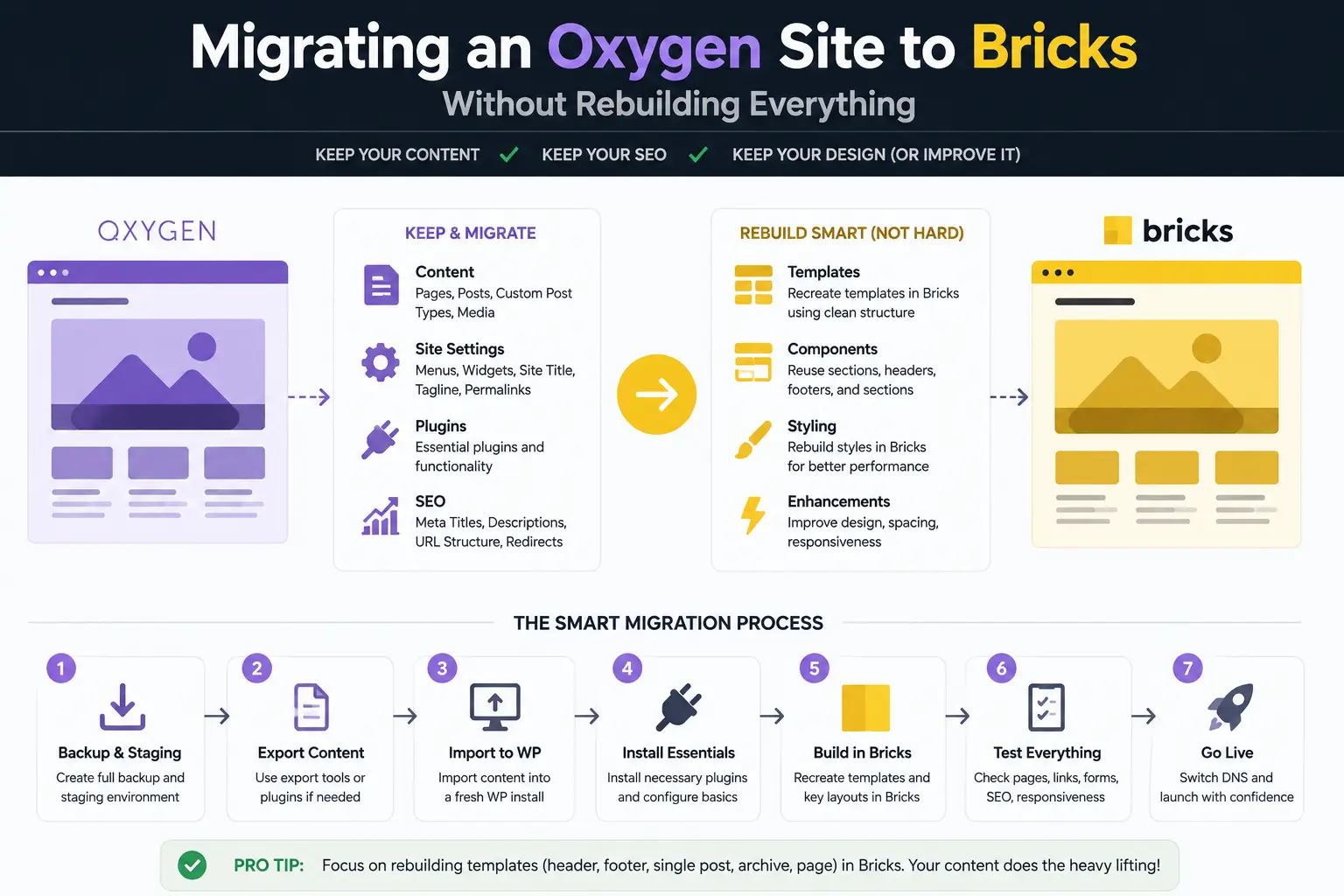
Oxygen and Bricks store templates in incompatible formats, and the architectural mismatch runs deeper than the file format. Oxygen is a plugin that switches off the theme layer and takes over rendering. Bricks is a theme. Moving between them is not exporting and importing, it is rebuilding the presentation layer on a different foundation.
The good news is that this is a smaller job than it sounds, because the presentation layer is not where most of the value of a website sits. Your content, your media library, your custom fields, your URL structure, your SEO metadata and your plugins are all outside the builder and unaffected. What you are rebuilding is templates and styling.
Set the expectation with the client accordingly. This is not maintenance. It is a project, and it needs a project’s budget and timeline.
What transfers, and what only transfers conceptually
| Asset | Transfers? | Notes |
|---|---|---|
| Posts, pages, media | Yes | Lives in WordPress, untouched by either builder |
| ACF and custom field data | Yes | Field values are database rows, not builder objects |
| URL structure and redirects | Yes | Nothing to do, provided you do not change slugs |
| SEO metadata | Yes | Owned by the SEO plugin, not the builder |
| Design decisions | Conceptually | You rebuild them, but you do not re-decide them |
| Class naming system | Conceptually | Names carry over; the styling is reapplied |
| Templates | No | Rebuilt one by one |
| Global styles and variables | No | Redefined, though the values are known |
| Dynamic bindings | No | Every field mapping is recreated by hand |
| Custom code blocks | Partly | PHP and JS usually port; the hooks around them change |
Template and class mapping
Work template-first rather than page-first. Most Oxygen sites have far fewer templates than pages, and rebuilding the six templates behind two hundred pages is a tractable job in a way that rebuilding two hundred pages is not.
Inventory what you actually have before you open Bricks: which templates exist, what conditions decide when each one applies, and which are genuinely in use. On a site more than a couple of years old there are usually templates that no longer match anything, and porting those is pure waste.
Class names are the part that ports most easily, and it is worth being deliberate about it. If your Oxygen build used a consistent naming convention, recreate the same names in Bricks. The styling has to be reapplied either way, but keeping the names means your markup, your documentation and your team’s mental model all stay valid. Renaming everything mid-migration is a second project disguised as tidying up.
Global styles and variables
Both builders support global styling, so this maps well in principle and still needs care in practice.
Extract the real values first: colours as hex, type scale as actual sizes and line heights, spacing scale as the numbers you used. Get them out of the builder and into a document. This is the one step people skip, and it is the reason migrations end up with slightly different greys on different templates.
Rebuild the variable set in Bricks before you touch a single template. If you start building templates and define variables as you need them, you will end up with a set that reflects the order you happened to work in rather than the design system you had.
Dynamic data and query loops
This is where migrations go wrong quietly, so it deserves more care than the visual work.
Every dynamic binding is recreated by hand: field mappings, query loop parameters, conditional display rules, relationship lookups. The concepts translate closely between the two builders, which makes this feel easier than it is. The risk is not that a binding fails loudly, it is that it silently returns the wrong set.
Write down the intended behaviour of each query before you rebuild it: which post type, which taxonomy terms, what ordering, how many, what happens when it is empty. Then verify against that written expectation rather than against whether the page looks right. The Bricks side of this is covered in detail in Bricks and ACF: building dynamic templates.
What has no equivalent and needs a genuine rebuild
Being specific about this is the difference between an accurate quote and an overrun.
- Oxygen-specific code blocks and hooks. The PHP inside usually ports, but the mechanism that fires it does not. Each one needs a new home in Bricks and a retest.
- Add-ons built for Oxygen. Anything from the Oxygen add-on ecosystem has no Bricks counterpart by definition. Find the equivalent, find a replacement, or rebuild the functionality.
- Anything relying on Oxygen replacing the theme. Templates that assumed no theme layer need rethinking against a build where the theme is the builder.
- Reusable parts and components. The concept exists on both sides; the implementations do not interchange, so each is rebuilt once and then reused.
- Interactions and animation. Rebuilt individually, and this is the category most likely to be quietly dropped and never noticed until the client asks.
Inventory these before quoting. They are the items that turn a predictable job into an unpredictable one.
Staging strategy
Never do this on production, and do not do it on a staging copy you intend to push over the top of a live site either, because a full push replaces the database and takes the live content with it.
- Clone to staging. Full copy, including the database, on the same PHP version as production.
- Install Bricks alongside Oxygen. Both can be present while you work. Keep Oxygen active as the renderer until the new templates are ready.
- Rebuild templates on staging in dependency order: global styles, then header and footer, then the templates that most pages depend on, then the long tail.
- Switch the renderer on staging and work through the site systematically rather than checking the homepage and declaring victory.
- Freeze content changes for the cutover window, or plan to re-sync content, because content edited on production during a long migration is content you will lose.
- Deploy during a quiet period, with the rollback plan already tested rather than merely written.
The rollback plan
Take a full backup immediately before cutover and confirm you can actually restore it, on a different environment, before you need it. An untested backup is a hope, not a plan.
The practical rollback for this specific migration is straightforward if you have not deleted anything: Oxygen’s templates remain in the database while Bricks is active, so reactivating Oxygen as the renderer returns the previous site. That stops being true the moment someone tidies up by uninstalling Oxygen, which is why the uninstall belongs weeks after the cutover, not on the same afternoon.
Keep the Oxygen licence active through that window too. Letting it lapse the day you switch is a false economy if you need to go back.
What this actually costs
The honest answer is that it costs roughly a rebuild of the templates, and saves you the design, content and discovery work. On a small brochure site that is a couple of days. On a site with custom post types, conditional templates and a shop, it is considerably more, and the dynamic data is the part that expands.
Set against that: no client-visible improvement. The site looks the same and, on the performance side, both builders are close enough that you should not promise a speed gain. The measured position is in our page builder performance benchmarks, and the honest summary is that migrating for speed alone is not a case that survives contact with the numbers.
Which is the real conclusion of this guide. Migrate because Bricks fits how your team works, not because you expect the site to get faster.
Frequently Asked Questions
Can you import an Oxygen site into Bricks?
No. There is no importer, and there is unlikely ever to be one, because the two store templates in incompatible formats and Oxygen replaces the theme while Bricks is the theme. Anything describing a one-click migration is describing a content migration, which is a different and much smaller problem.
How long does an Oxygen to Bricks migration take?
Budget on the order of a fresh build for the templates, minus the design and discovery work you already did. The layout decisions are made and the content exists, which is genuinely the larger half of a project, but every template, class and dynamic binding is rebuilt by hand. Anyone quoting you a fixed figure has not seen the site.
Does the content survive the migration?
Posts, pages, media and custom fields survive because they live in WordPress, not in the builder. What does not survive is layout: anything built inside Oxygen’s structure disappears with Oxygen. Content stored in ACF fields transfers cleanly, which is a strong argument for keeping content out of builder-specific containers in the first place.
Should I migrate at all now that Oxygen 6 exists?
For most existing Oxygen sites, no. The usual reason for leaving was the fear that Oxygen was abandoned, and the Oxygen 6 rebuild removed that. Migrate when you have a positive reason to prefer Bricks, such as team onboarding speed or native forms, not because of a reputation issue that no longer applies.
What is the biggest risk in this migration?
Losing dynamic bindings silently. A broken layout is obvious the moment you look at it. A query loop that returns the wrong posts, or a conditional that stopped evaluating, can look completely normal on the page you are testing and be wrong everywhere else. Test the data, not just the design.
Rebuild templates rather than pages, extract your design tokens before you start, treat dynamic bindings as the risky part, and keep Oxygen installed and licensed until the new build has survived a few weeks in production.
Need a WordPress developer?
Let's build something fast, scalable, and SEO-ready — from a custom theme to a full headless stack.
Get in Touch