Every build ends the same way. The site is signed off, the invoice is paid, and you send over a login. What happens in the next ten minutes decides whether you keep that client for three years, or hear from them once, in a panic, eighteen months later.
A white-label WordPress handover is not a logo swap in the admin bar. It is a set of decisions about branding, access, licences and documentation — made on purpose, before the credentials leave your hands. Get them right and the handover is a scheduled event. Get them wrong and you are still resetting someone’s password for free in 2028.
Disclosure: some links in this article are affiliate links. If you buy through them we may earn a commission at no extra cost to you. It does not change what we recommend.
The quick verdict
If you take only four things from this article, take these:
- Brand the interface, not the infrastructure. Rebrand the dashboard so the site feels like yours to support. Do not pretend it is not WordPress.
- Give the client the smallest role that lets them do their job. For most clients that is Editor, not Administrator.
- The client owns the domain. Always. Nearly everything else is negotiable. That one is not.
- Settle licence ownership in the contract, not on handover day. Write down exactly what stops working the month they stop paying you.
Everything below is the detail behind those four lines.
What white-labelling actually covers
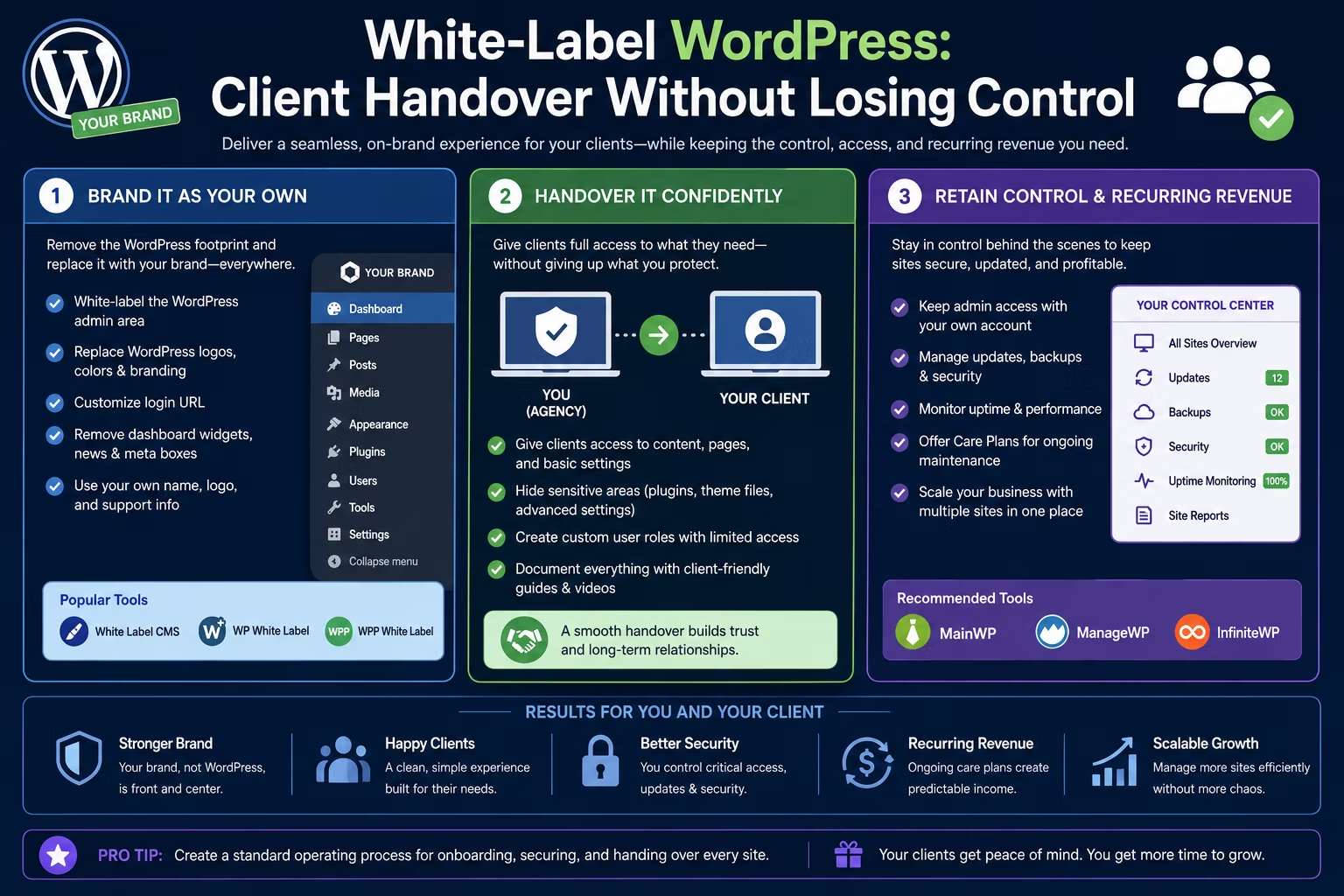
White-labelling a WordPress site means replacing the generic, third-party branding a client sees with your own. In practice that is a short list:
- the login screen logo and background
- the admin bar logo and the “Howdy” greeting
- the dashboard welcome panel, replaced with your own support panel
- the admin footer text
- plugin menu labels, renamed or hidden entirely
- the page builder, hidden from roles that should not touch it
That is the visible layer, and the plugins that handle it are a commodity — several free options in the WordPress directory cover the whole list, with paid versions adding per-role dashboards and reusable branding presets. It is genuinely useful work, because a tidy dashboard with your support details on it is the single cheapest retention tool you will ever install. A client who sees your logo every time they log in knows who to call.
Be honest about the limits, though. White-labelling is cosmetic. It does not change what the software is or who wrote it. Anyone with file access, or anyone who views the page source, can identify the plugins in about thirty seconds. WordPress itself is licensed under the GPL, and every plugin in the official directory has to ship under a GPL or GPL-compatible licence. Hiding a plugin’s name in a menu is presentation. It is not ownership, and it is not a secret you can enforce.
So brand the experience. Do not build a story you cannot defend if the client hires a developer who asks one obvious question.
What to white-label, and what to leave alone
| Layer | White-label it? | Why |
|---|---|---|
| Login screen | Yes | First thing they see. Cheap, high impact. |
| Admin bar and footer | Yes | Puts your support contact in front of them daily. |
| Dashboard widgets | Yes | Replace clutter with your own “need help?” panel. |
| Plugin menu labels | Selectively | Rename what confuses them. Hide what they must not touch. |
| Page builder access | Hide by role | Protects layouts from accidental edits. |
| SEO plugin settings | Restrict by role | Let them write meta text. Keep schema and redirects locked. |
| Hosting control panel | Depends on the deal | Only if the account is genuinely theirs. |
| Domain registrar | Never hide | Their asset, their account, their name on it. |
| Analytics and Search Console | Never hide | Client-owned property, you get delegated access. |
| The fact it runs WordPress | Never | Indefensible, and it will be discovered. |
The pattern is simple. Cosmetic layers get branded. Ownership layers get handed over cleanly. Nothing in between should be left ambiguous.
Two rows deserve a note. Page builder access is the one clients break most often, so hide the builder from every role except your own and let them edit content in the block editor instead. And an SEO plugin with a built-in role manager, such as Rank Math, lets you split the difference properly: the client writes page titles and meta descriptions, while schema, redirects and sitemap settings stay locked to your account.
Access: what to give and what to keep
Most handover disasters are access problems wearing a costume. The fix is to separate two things people constantly blur together: ownership and access.
Ownership means the account is in the client’s name, billed to the client’s card, recoverable by the client’s email. Access means you can log in. You can hold access to something you do not own, and you should own almost nothing that carries the client’s business on it.
Give the client, in their own name
- The domain registration. Register it under the client’s details from day one, at a mainstream registrar such as Namecheap, and add yourself as a technical contact rather than owning it yourself. Changing the registrant later can trigger a transfer lock at most registrars, so it is far less painful to start correctly than to fix it during an exit.
- Google Analytics and Search Console properties, with your agency account granted access.
- Any account they pay for directly, including email and payment gateways.
Give the client, scoped
- A WordPress account with the lowest role that works. WordPress ships with a fixed set of roles and capabilities, and Editor covers publishing, media and page edits without exposing plugins, users or themes. Reserve Administrator for the one person who genuinely needs it, and say so in writing.
- Hosting access at the environment level rather than the account level, if your host supports team members with limited permissions. Choosing hosting built around staging and client user access makes this a settings change instead of an argument.
Keep, and say that you are keeping it
- Your own Administrator account, disclosed in the contract. Not a hidden backdoor. A named, visible account the client agreed to.
- Agency-level licence keys, if the licences are yours.
- Your deployment, backup and monitoring tooling.
The rule that keeps you honest: never hold something the client cannot recover without you. Holding the keys feels like security. It is actually a liability, and it makes your exit look hostile even when it is not.
Licences: yours, theirs, and what happens when they leave
This is where handovers turn sour, because a licence key is not the software. Under the GPL, your client already has the right to the code running on their site. What a licence key buys is updates and support. When it lapses, the site keeps working — until a plugin needs a security patch it can no longer pull. That is a slow failure, not an instant one, which is exactly why it catches people out.
There are three workable models.
1. Agency-owned licences. You hold an unlimited or multi-site licence and deploy it across your portfolio. This is the cheapest model per site and the strongest retention lever, because the licences leave when the client does. It only works if you say so plainly. A builder like Oxygen, sold as a one-off unlimited-site licence, is the obvious candidate here, and it also lets you restrict builder access by role so clients edit content without touching layouts. Do the same maths for your whole stack — our breakdown of pricing and licensing for WordPress themes and plugins covers where the per-site model stops making sense.
2. Client-owned licences. The client buys each licence in their own account and you are added as a user. More admin, higher cost per site, but the cleanest possible exit. Worth it for larger clients and for anyone with a procurement process.
3. Split. The client owns the licences that must outlive the relationship, such as their SEO plugin, forms and commerce extensions. You own the build-time tooling nobody else will ever open. This is what most established studios actually do.
Whichever you pick, the contract needs one paragraph naming every paid plugin, who owns it, what the renewal costs, and what happens if the relationship ends. No client should ever discover the answer to that question by accident.
The handover checklist
Run the same list every time. Fifteen minutes of process beats a year of ad-hoc support requests.
1. Confirm the domain is registered in the client’s name and the contact email is one they control.
2. Point the DNS and confirm propagation, SSL and the www redirect.
3. Create the client’s WordPress account at the correct role and delete every placeholder or test user.
4. Change any shared password created during the build.
5. Apply your white-label configuration: login, admin bar, footer, dashboard panel, support links.
6. Hide or rename the plugin menus the client should not open.
7. Restrict page builder and SEO settings by role, keeping content editing available.
8. Verify backups are running to somewhere the client can reach without you.
9. Confirm the security plugin, uptime monitoring and update policy, and name who is responsible for each.
10. Transfer or delegate Analytics, Search Console, and the tag manager container.
11. Record a short walkthrough video and write the one-page runbook.
12. Hand over the credential list through a password manager, never over email.
13. Book the training call and the first review date at the same time.
14. Archive a full copy of the site, licences and documentation on your side, with a retention date.
If your builds follow a repeatable client launch workflow, this list belongs at the end of it as a fixed stage rather than something you improvise per project.
Documentation and training people actually use
Nobody reads a forty-page PDF. Assume the person who received your handover pack has left the company in a year, and write for their replacement.
Three artefacts do the job:
- A one-page runbook. Where things live, who to call, what each plugin is for in one sentence, and what the client must never change. One page. Print length.
- Three to five short videos, two to four minutes each. Edit a page. Add a blog post. Upload an image properly. Update a menu. A screen recording with a voice-over is enough. Long videos never get watched twice.
- One practice task. On the training call, have the client make a real edit while you watch. It surfaces every misunderstanding in about ninety seconds, and it is the only part of training that reliably sticks.
Credentials are the exception to “keep it simple”. Send them through a shared password manager vault rather than a document, so access can be revoked cleanly on either side later.
Store all of it somewhere the client controls, and keep your own copy. The same documentation is what protects you if they ever move the site to another host or team — a clean, documented exit is worth more in referrals than a messy lock-in was ever worth in retainers.
Making handover the start of something, not the end
Handover is the natural moment for a client to drift away, so put something in its place before they do.
- Book the next contact before you finish the current one. A thirty-day check-in call, agreed on the training call, converts far better than an email sent six weeks later.
- Put your support panel on the dashboard. A branded “need help?” widget with your email and booking link means the path of least resistance leads back to you.
- Offer one care plan, not three. Updates, backups, monitoring, security and a small monthly block of changes. Multiple tiers create decisions; one clear plan creates a yes or a no.
- Report something monthly. Even a five-line email listing updates applied, uptime and one performance number keeps you visible between requests.
- Standardise your stack. The fewer plugin combinations you support, the cheaper each retainer is to run. Standardising on a consistent plugin set across every build is what makes maintenance profitable rather than break-even.
If you want the branding to run deeper than the dashboard, the infrastructure layer is the next step — reselling under your own name changes the invoice as well as the logo. That is a separate decision with its own economics, covered in our guide to reseller and white-label hosting options for WordPress agencies.
Final recommendation
Treat white-labelling as a client-experience decision and handover as a contract decision, and keep the two apart in your head.
Brand every screen the client touches, because it is cheap and it makes support feel deliberate. Then hand over ownership honestly: their domain, their analytics, their data, a role that fits their job, and a written answer to “what happens if we part ways”. Own the licences if that suits your model, and say so out loud.
The agencies that keep clients are not the ones holding the passwords. They are the ones whose handover was so clean that the client never seriously considered leaving.
Frequently Asked Questions
Is white-labelling a WordPress site legal?
Yes. Rebranding the admin interface of a site you built is normal agency practice, and plugins built for this purpose exist in the official WordPress directory. What you cannot do is claim you wrote WordPress or a third-party plugin, or strip a licence and authorship notice out of the code. WordPress and its directory plugins are distributed under the GPL, which lets you modify and use them freely but does not transfer authorship.
Should I give a client Administrator access to their WordPress site?
Usually one person should have it, and everyone else should be an Editor. The Editor role covers pages, posts, media and menus, which is what most clients actually need. Administrator adds plugins, themes, users and core updates, which is where accidental damage comes from. Name the single Administrator in the handover document so it is a decision rather than an oversight.
Who should own the plugin licences after handover?
It depends on your model, but it must be written down. Agency-owned licences are cheaper per site and keep the client tied to your maintenance plan. Client-owned licences cost more but give a clean exit. Many studios split them, letting the client own the plugins that must outlive the relationship and keeping build-time tooling themselves. The contract should list each paid plugin, its owner, its renewal cost, and what happens when the relationship ends.
What happens to a WordPress site if plugin licences are not renewed?
The site keeps running. A licence key controls updates and support, not the right to use the software, so nothing switches off at midnight. The risk builds over time: without updates the plugin stops receiving security patches and eventually breaks against a newer PHP or WordPress version. That is a slow, silent failure, which is exactly why it should be spelled out at handover.
Who should own the domain name, the agency or the client?
The client, without exception. Register it in their name and with their email address from the start, and add yourself as a technical contact if you need day-to-day control. An agency-owned domain is the single most damaging thing you can hold, because it turns any dispute into a hostage situation and can delay a transfer while registrar lock periods clear.
How long should a client training session be?
About forty-five minutes, supported by short recorded videos. Cover only the tasks the client will genuinely perform, have them complete one real edit while you watch, and send the recording afterwards. Anything longer is not retained. A two-hour walkthrough with no practice task is far less effective than a fifteen-minute session that ends with the client doing something themselves.
Planning your next client build? Standardise the handover before you standardise anything else. Work through the checklist above, settle your licence model in writing, and browse the rest of the BuildWithRab blog for the hosting, builder and plugin stack that makes a white-label workflow repeatable across every project.
Need a WordPress developer?
Let's build something fast, scalable, and SEO-ready — from a custom theme to a full headless stack.
Get in Touch